UI Testing with Playwright using HyperExecute and SmartUI SDK
This documentation will guide you step-by-step to execute the SmartUI tests on the HyperExecute platform using Selenium
Prerequisites
To run the Tests on HyperExecute from your Local System, you are required:
- Your TestMu AI Username and Access key
- HyperExecute CLI in order to initiate a test execution Job .
- Setup the Environmental Variable
- HyperExecute YAML file which contains all the necessary instructions.
- Login to TestMu AI SmartUI with your credentials.
Step 1: Create a SmartUI Project
The first step is to create a project with the application in which we will combine all your builds run on the project. To create a SmartUI Project, follow these steps:
- Go to Projects page
- Click on the
new projectbutton - Select the platform as CLI or Web for executing your
SDKtests. - Add name of the project, approvers for the changes found, tags for any filter or easy navigation.
- Click on the Submit.
After creating the project, you will get your PROJECT_TOKEN. You need to keep this project token safe as it will be used in the further steps below.
Step 2: Setup Your Test Suite
You can use your own project to configure and test it. For demo purposes, we are using the sample repository.
Download or Clone the code sample for the Maestro framework from the TestMu AI GitHub repository to run the tests on the HyperExecute.
 View on GitHub
Configure Your Test Suite
In the playwrightCloud.js file, update the following capabilities
  const capabilities = {
    "LT:Options": {
      build: "Playwright SmartUI Build", // Mention your desired build nameP
      name: "Playwright SmartUI Test", // Provide the name of your test
    },
  };
Step 3: Setup the CLI in your Test Suite
After cloning / downloading the sample repo, you need to setup the CLI and the environment variables.
Download the HyperExecute CLI
The CLI is used for triggering the tests on HyperExecute. It is recommend to download the CLI binary on the host system and keep it in the root directory of the suite to perform the tests on HyperExecute.
You can download the CLI for your desired platform from the below mentioned links:
Setup Environment Variable
Now, you need to export your environment variables LT_USERNAME and LT_ACCESS_KEY that are available in the TestMu AI Profile page.
Run the below mentioned commands in your terminal to setup the CLI and the environment variables.
- Linux / MacOS
- Windows
export LT_USERNAME="undefined"
export LT_ACCESS_KEY="undefined"
set LT_USERNAME="undefined"
set LT_ACCESS_KEY="undefined"
Step 4: Configure YAML in your Test Suite
You need to edit the PROJECT_TOKEN: "YOUR_PROJECT_TOKEN" flag and enter your project token that show in the SmartUI app after, creating your project.
---
version: 0.1
globalTimeout: 90
testSuiteTimeout: 90
testSuiteStep: 90

runson: win

autosplit: true

retryOnFailure: true
maxRetries: 1

concurrency: 1

env:
  PROJECT_TOKEN: "YOUR_PROJECT_TOKEN" #Enter your project token here

pre:
  - npm install @lambdatest/smartui-cli @lambdatest/playwright-driver playwright
  - npx smartui config:create smartui-web.json

post:
  - cat hyp-smartui-sdk.yaml

testDiscovery:
  type: raw
  mode: static
  command: ls sdk/playwrightCloud.js

testRunnerCommand: npx smartui exec node sdk/playwrightCloud.js --config smartui-web.json

jobLabel: ["smart-ui-sdk", "hyperexecute", "playwright"]
It is mandatory to mention these commands in the pre flag to download all the necessary dependencies
Verifiedpre:
- npm install @lambdatest/smartui-cli @lambdatest/playwright-driver playwright
- npx smartui config:create smartui-web.json
Step 5: Execute your Test Suite
NOTE : In case of MacOS, if you get a permission denied warning while executing CLI, simply run
chmod u+x ./hyperexecuteto allow permission. In case you get a security popup, allow it from your System Preferences → Security & Privacy → General tab.
Run the below command in your terminal at the root folder of the project:
Verified./hyperexecute --config RELATIVE_PATH_OF_YOUR_YAML_FILE
OR use this command if you have not exported your username and access key in the step 3.
Verified./hyperexecute --user undefined --key undefined --config RELATIVE_PATH_OF_YOUR_YAML_FILE
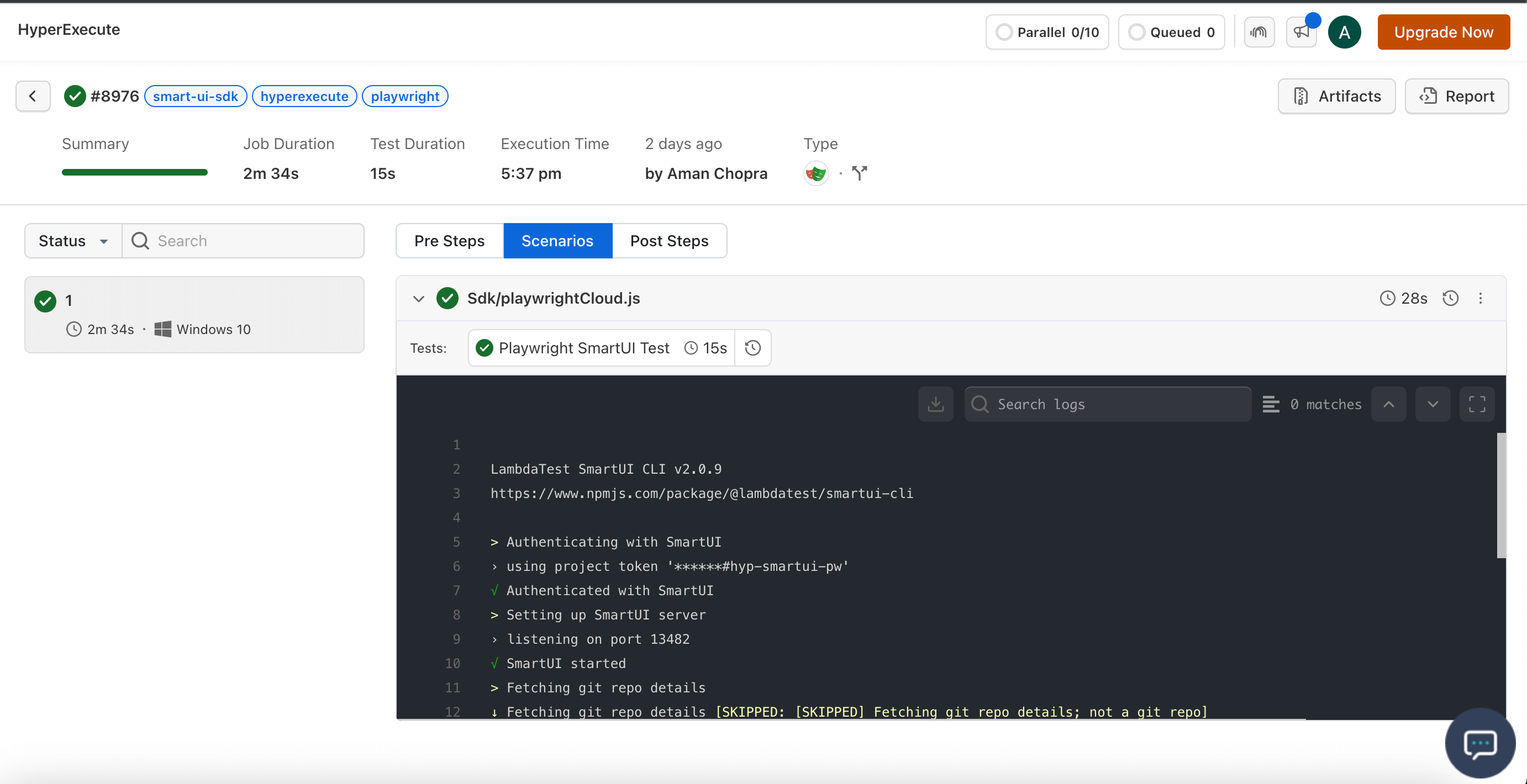
Step 6: Monitor the Test Execution
Visit the HyperExecute Dashboard and check your Job status.


 Chat with Us