How to Perform API Testing With Karate on HyperExecute
To run Karate API tests on HyperExecute, set your TestMu AI credentials, configure HyperExecute.yaml, and trigger the run with the HyperExecute CLI. Karate is an open-source framework for API test automation, mocks, performance testing, and UI automation that uses Gherkin syntax with Java. On HyperExecute, the TestMu AI test orchestration platform, it autosplits your .feature files across parallel nodes, retries only the scenarios that fail, can start Karate mock servers inside the same run, and collects logs and Cucumber reports in the dashboard.
Run your own Karate (Java + Maven) project or the ready-made sample used in the steps below.
How HyperExecute runs Karate
- Autosplit across nodes. HyperExecute discovers your
.featurefiles and distributes them across parallel runners, one feature per runner, up to theconcurrencyyou set. - Scenario-level retry. Failed scenarios re-run on their own instead of forcing a full-suite rerun.
- In-run mock servers. A
backgroundstep starts a Karate mock server for the run, so the system under test gets controlled responses without separate mock infrastructure. Apoststep stops it. - Unified reporting. Per-test logs, console output, and Cucumber reports are collected in the HyperExecute dashboard.
Prerequisites
Before you start, make sure you have:
- A TestMu AI account. Get your
LT_USERNAMEandLT_ACCESS_KEYfrom Username and Access Key. - Git, to clone the sample repository.
HyperExecute builds and runs the suite on the grid, so you do not need Java or Maven installed locally. Install them only if you want to run the suite on your own machine first.
Run Karate API tests on HyperExecute
Step 1: Clone the sample repository
Clone the Karate sample from the TestMu AI GitHub repository, or use your own project.
Download or clone the Karate sample from the TestMu AI GitHub repository to run the tests on HyperExecute.
 View on GitHub
Step 2: Download the HyperExecute CLI
The CLI triggers your tests on HyperExecute. Download the binary for your platform and copy it into the root folder of the sample repository.
Step 3: Configure HyperExecute.yaml
HyperExecute.yaml in the sample repo tells HyperExecute how to build, discover, and run the suite. The sections below explain each part.
Environment and runtime
Set the OS, Java runtime, and how many sessions run in parallel:
Verifiedversion: 0.1
runson: linux # OS the tests run on (e.g. linux, win)
autosplit: true
concurrency: 10 # number of test sessions to run in parallel
runtime:
language: java
version: 11
Resolve Maven dependencies
The pre step pulls all Maven dependencies into a local .m2 directory once, so each runner reuses them for a reproducible build:
pre:
  - mvn -Dmaven.repo.local=./.m2 dependency:resolve
Test runner command
testRunnerCommand runs one feature file per runner. With autosplit: true, HyperExecute passes each discovered .feature path in through the $test placeholder:
testRunnerCommand: mvn test -Dtest=MyApiRunner -DFeaturePath="$test" -Dhub=https://LT_USERNAME:LT_ACCESS_KEY@hub.lambdatest.com/wd/hub -Dmaven.repo.local=./.m2
-Dtest=MyApiRunner: the JUnit 5 runner class (annotated with@Karate.Test) that executes the feature file fromFeaturePath.-DFeaturePath="$test":$testis one.featurepath supplied by the discovery command.-Dhub=...: optional. Only needed when a Karate test drives a browser through the Selenium Grid for UI tests.-Dmaven.repo.local=./.m2: reuses the local Maven repo so dependencies are not re-downloaded on each runner.
By default this runs one feature file per runner. To run a subset instead (for example, only scenarios tagged @smoke, a specific runner class, or a folder of features), pass Karate options:
mvn test -Dkarate.options="--tags @smoke"
Test discovery
testDiscovery lists the .feature files to run and hands them to the runner. HyperExecute splits this list across the parallel nodes:
testDiscovery:
  type: raw
  mode: static
  command: snooper --targetOs=win --featureFilePaths=src/test/java/app --frameWork=java | sed 's/:.*//' | uniq
snooper: a built-in TestMu AI utility that lists matching test files.--targetOs: the OS path format snooper uses when listing feature-file paths.--featureFilePaths=src/test/java/app: where the Karate.featurefiles live.--frameWork=java: the framework snooper parses for.sed 's/:.*//' | uniq: trims and de-duplicates snooper's output.
How discovery and execution work
The discovery command runs first and lists paths to every .feature file. HyperExecute saves each path as a test case and passes one at a time to a runner through the $test placeholder. Each runner executes its feature in parallel, up to concurrency:
src/test/java/app/login.feature
src/test/java/app/signup.feature
src/test/java/app/payments.feature
The full configuration also defines a background step that starts the Karate mock server (mvn clean test -Dtest=LocalRunner), report/partialReports for the Cucumber reports, and a post step that stops the mock server (curl http://localhost:8080/__admin/stop):
loading...
For every YAML key and project-specific option, see the YAML parameters reference.
Step 4: Trigger the run from the CLI
From the project root directory, run the CLI command in your terminal:
Verified./hyperexecute --user undefined --key undefined --config HyperExecute.yaml
If macOS reports permission denied when you run the CLI, make it executable with chmod u+x ./hyperexecute. If a security popup appears, allow the binary from System Preferences → Security & Privacy → General.
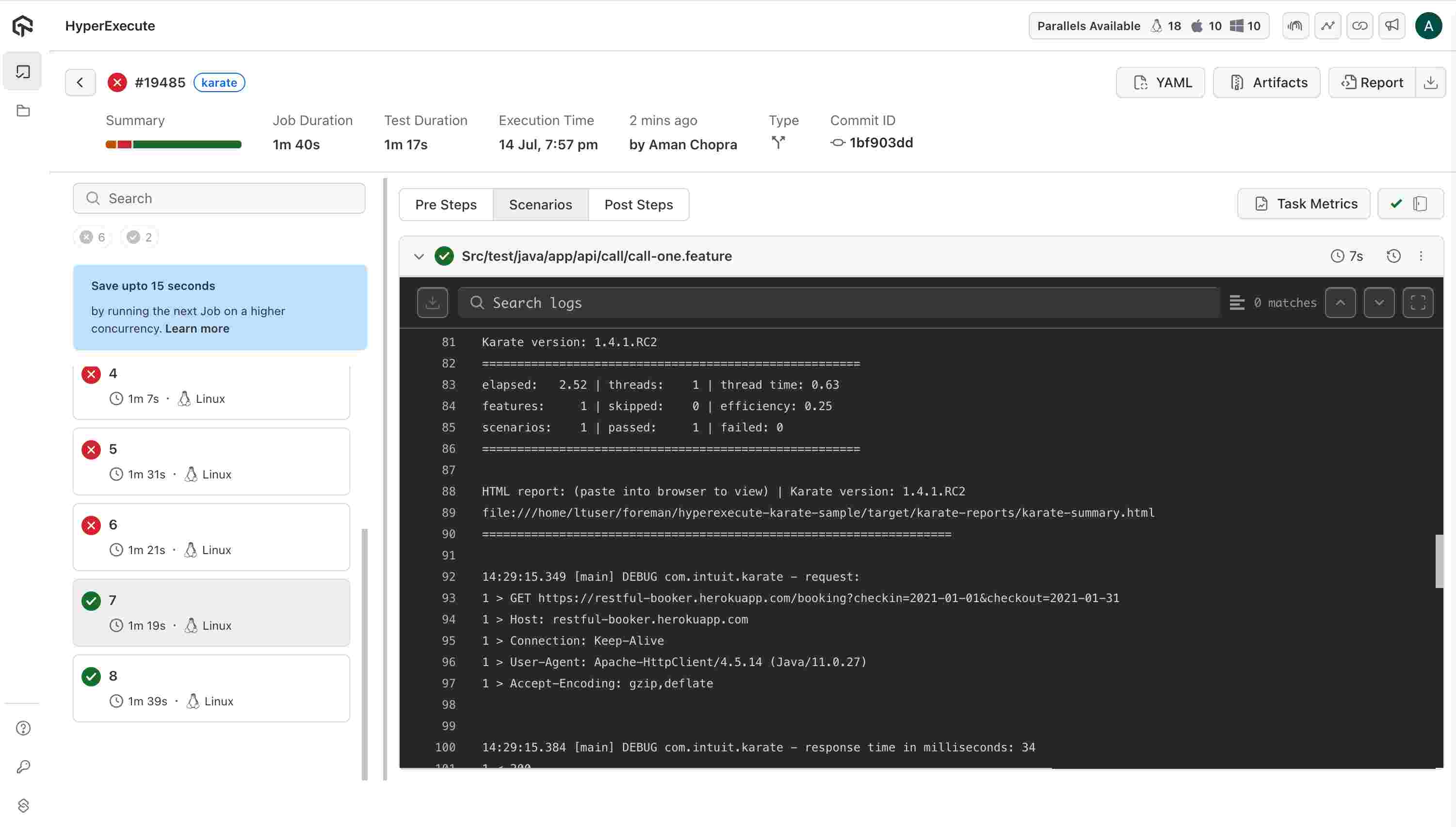
A successful run shows the job as Completed in the HyperExecute dashboard, with each .feature file executed as a separate task and the Cucumber reports attached. Open any task to inspect its request and response logs.
Related resources
Smart test splitting and multiplexing
Distribute tests across parallel runners and control how they split.
Fail Fast
Stop a run on the first failure to save minutes.
Reports and logs
Real-time terminal logs and rich test reports.
Getting started with HyperExecute
Set up HyperExecute and trigger your first job on the grid.


 Chat with Us