Capture Only Changed Stories with SmartUI Storybook (SmartSnap)
A large Storybook takes a long time to capture, even when a pull request touches one component. From version 1.4.0 of @lambdatest/smartui-storybook, the --only-changed flag captures only the stories that your changes can affect. Every other story is copied from the baseline build, so each build still has a screenshot for every story.
SmartUI marks these builds with a SmartSnap label.
If you have not set up SmartUI Storybook yet, start with Storybook Integration.
How it works
When you pass --only-changed, the CLI does the following before it uploads your static build:
- Finds the baseline build. It asks SmartUI for the build that this build will be compared against: the latest approved build on your project's baseline branch.
- Lists the changed files. It runs
git diffbetween the commit of that baseline build andHEAD, and adds the files you changed but have not committed yet. Every commit since the baseline build counts, so a pull request with several commits is fully covered. - Finds the affected stories. It reads
preview-stats.json, which Storybook writes when you build with--stats-json. From each changed file it follows the imports up to the story files that use it. A change to a shared module, such as a design token file, selects every story that imports it, directly or through other modules. - Captures and copies. SmartUI renders only the affected stories. It copies the screenshots of all other stories from the baseline build into the new build.
When a changed file cannot be traced this way, the CLI captures every story instead and prints the reason. See When every story is captured.
Prerequisites
@lambdatest/smartui-storybookversion1.4.0or later. Runsmartui --versionto check.- A static Storybook build. A Storybook URL is not supported, see Limitations.
- Storybook built with stats:
- Storybook 7 and later:
storybook build --stats-json - Storybook 6.4 and 6.5:
build-storybook --webpack-stats-json
- Storybook 7 and later:
- The CLI runs inside the git repository of your Storybook, with
gitinstalled. - An approved build on your project's baseline branch. Without one, the first build captures every story and becomes the starting point.
Capture only the changed stories
Build Storybook with stats, then pass --only-changed:
npx storybook build --stats-json
smartui storybook ./storybook-static --config .smartui.json --only-changed
You can also turn it on in the config file, with the onlyChanged key in the storybook block:
{
  "storybook": {
    "browsers": ["chrome", "firefox"],
    "viewports": [[1280, 720]],
    "onlyChanged": true
  }
}
The CLI prints which stories it selected and why. For a change to one component:
[smartui] --only-changed: 2 of 43 stories affected by 5812d1a..ac6117f (1 changed files)
[smartui]   src/components/Avatar/Avatar.js
When no story is affected, for example when a pull request changes only Markdown files, SmartUI still creates a build with every story copied from the baseline. The commit then gets its SmartUI status as usual:
[smartui] --only-changed: no stories affected by 299108e..7d6dae0, carrying all 43 forward
--only-changed works with include and exclude. The filters are applied first, and the CLI then picks the affected stories from the ones that are left. See Filter Stories with Include and Exclude.
Run it in CI
The CLI needs the commit of the baseline build in your clone to compare against. A shallow clone, such as the default actions/checkout with fetch-depth: 1, is fine when that commit is among the last 500 commits of the baseline branch. The CLI then fetches it with:
git fetch --quiet --no-tags --depth=500 origin <baseline branch>
If the baseline commit is older, set fetch-depth: 0 so that the checkout has the full history. If the commit still cannot be found, the CLI captures every story.
- GitHub Actions
On pull requests, GitHub checks out a detached merge commit, so set CURRENT_BRANCH to record the build on the pull request branch.
name: SmartUI Storybook
on: [pull_request]

jobs:
  visual-tests:
    runs-on: ubuntu-latest
    steps:
      - uses: actions/checkout@v4
      - uses: actions/setup-node@v4
        with:
          node-version: 20
      - run: npm ci
      - run: npx storybook build --stats-json
      - run: npm install -g @lambdatest/smartui-storybook@latest

      - name: SmartUI visual check
        env:
          PROJECT_TOKEN: ${{ secrets.PROJECT_TOKEN }}
          CURRENT_BRANCH: ${{ github.head_ref }}
        run: smartui storybook ./storybook-static --config .smartui.json --only-changed --fail-on changes
To fail the job on visual changes and handle each exit code, see CI Gating and Exit Codes.
When every story is captured
For some changes the CLI cannot tell which stories are affected. It then captures every story, prints the reason, and the build is a normal build without the SmartSnap label. The message has this form:
[smartui] --only-changed: capturing all 43 stories: src/ds/styles/vars.css is not in the Storybook dependency graph
| Change or situation | Why every story is captured |
|---|---|
| The project has no approved build on the baseline branch yet | There is nothing to compare against. |
| The commit of the baseline build cannot be found in the clone, even after the fetch | The CLI cannot list the changed files. |
preview-stats.json is missing from the static build | The CLI cannot follow imports. Build Storybook with --stats-json. |
A file under .storybook/, or a module that only a preview file imports | Storybook applies these to every story. |
package.json | Scripts and dependencies can change any story. |
The SmartUI config file that you pass with --config | Browsers, viewports or other settings changed. |
A lockfile (package-lock.json, yarn.lock, pnpm-lock.yaml) changes a package that no story imports | The package may be build tooling such as Vite, PostCSS or Babel. A package that stories do import selects only those stories. |
| Any other file that is not in the dependency graph | For example a CSS file pulled in with @import in a Vite build, an image referenced from CSS with url(), a file in staticDirs, .env, or a file that your Storybook config reads at build time. |
--only-changed with a Storybook URL | See Limitations. |
Some changed files never cause a full capture, even though they are not in the dependency graph:
- Markdown files (
.md) - CI configuration:
.github/,.gitlab-ci.yml,.circleci/,azure-pipelines.yml,Jenkinsfile - Test files:
*.test.*,*.spec.*and anything under__tests__/
The CLI can also capture a few more stories than really changed. For example, a component that imports a shared module through an index file (export * from './money.js') is selected when any module behind that index file changes. Those stories are compared as usual and show no changes.
SmartSnap builds in SmartUI
A build that used --only-changed shows a SmartSnap label next to the screenshot count. Hover over it to see how many screenshots SmartUI captured and how many it copied from the baseline build.
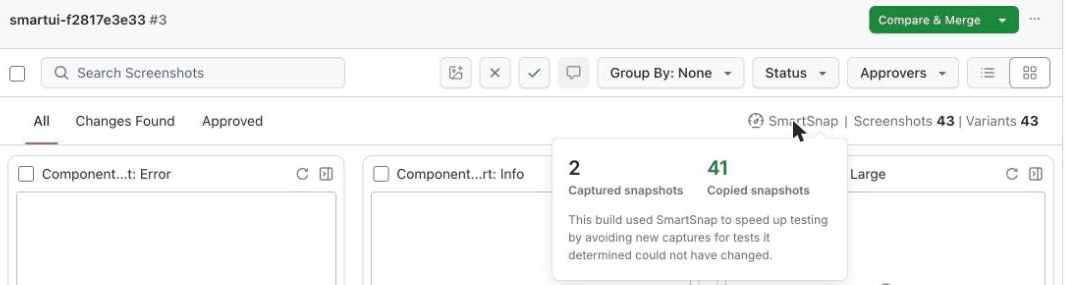
- Captured screenshots are compared with the baseline as usual and can show Changes Found.
- Copied screenshots come from the baseline build. They are marked Approved with a mismatch of
0.00%. They look like any other approved screenshot when you open them. - A build in which every story was captured, for any of the reasons above, has no SmartSnap label.
Baselines
- The baseline for
--only-changedis the latest approved build on your project's baseline branch. It is the same build that SmartUI compares the new build against. - When you approve a SmartSnap build on the baseline branch, it becomes the next baseline like any other approved build. Its copied screenshots are carried into the build after it.
- Builds on other branches are compared with the baseline branch. Approving them does not change the baseline.
- A build filtered with
includeorexcludeon the baseline branch has fewer screenshots than the baseline. SmartUI marks it as a partial build and does not use it as the next baseline. See Filtered builds and your baseline.
For how baselines work in your project, see Baseline Management.
The results file
With --fetch-results, the results file has an onlyChanged object:
{
  "onlyChanged": {
    "applied": true,
    "captured": 2,
    "total": 43,
    "commit": "ac6117f",
    "reason": "",
    "baselineBuildId": "d5a35dc0-6904-44a9-86ae-3671d89fc258"
  }
}
| Field | Description |
|---|---|
applied | true when only the affected stories were captured. false when every story was captured. |
captured | Number of stories that were captured. |
total | Number of stories in the build, after include and exclude. |
commit | The commit the build was made from. |
reason | Why every story was captured. Empty when applied is true. |
baselineBuildId | The baseline build the changes were measured from. Present only when applied is true. |
For the other fields, see Save the results with --fetch-results.
Limitations
-
Static builds only. With a Storybook URL, the CLI prints a warning and captures every story:
[smartui] Warning: --only-changed needs a static build directory (it reads preview-stats.json); capturing every story of the Storybook URL. -
No
--buildName.--buildNamewith--only-changed, or withonlyChangedin the config, stops the CLI with exit code2:[smartui] Error: --buildName is not supported with --only-changed (or storybook.onlyChanged in the config). Remove one of them. -
Git is required. Run the CLI inside the git repository of your Storybook. Outside a git repository, the CLI stops with exit code
1before the build starts.
Troubleshooting
| Message or symptom | What it means | What to do |
|---|---|---|
capturing all N stories: the project has no approved baseline build to compare against | There is no approved build on the baseline branch yet. | Approve the first build. The next builds capture only the affected stories. |
capturing all N stories: preview-stats.json not found in ... | Storybook was built without stats. | Build with storybook build --stats-json, or --webpack-stats-json for Storybook 6.4 and 6.5. |
capturing all N stories: the baseline build's commit ... is not in this clone | The baseline commit is older than the last 500 commits of the baseline branch, or the clone cannot fetch from origin. | Use fetch-depth: 0 in the checkout. |
capturing all N stories: <file> is not in the Storybook dependency graph | A changed file is not imported by any story, so the CLI cannot tell which stories it affects. | Nothing, if the file can change how stories look. Otherwise, move the change to a separate commit or pull request. |
--buildName is not supported with --only-changed and exit code 2 | The two options cannot be combined. | Remove --buildName. |
| Every build captures the same stories again | The changes are measured from the last approved build on the baseline branch, so a change stays selected until a build that contains it is approved there. | Approve the build on the baseline branch after the pull request is merged. |


 Chat with Us