Ignore and Select Regions on SmartUI Web Hooks
On the Web Hooks path (Selenium with driver.executeScript("smartui.takeScreenshot", config)), you can define an ignore or select region in two ways: a DOM selector or raw pixel coordinates. Coordinate regions work the same way as selectors and need no extra setup.
Both ignoreDOM and selectDOM support both input modes:
ignoreDOMexcludes the given region(s) from comparison.selectDOMrestricts the comparison to only the given region(s).
This gives the Web Hooks path the same region controls already available on RD Hooks and the CLI SDK, so you can express dynamic areas the way that best fits your test: for example, an element matched by selector, or a fixed rectangle on the page.
1. Ignore a region by coordinates
Pass a coordinates entry (a list of "x1,y1,x2,y2" strings) under ignoreDOM. SmartUI excludes those rectangles from the comparison. The four values are the left, top, right, and bottom edges of the rectangle in pixels.
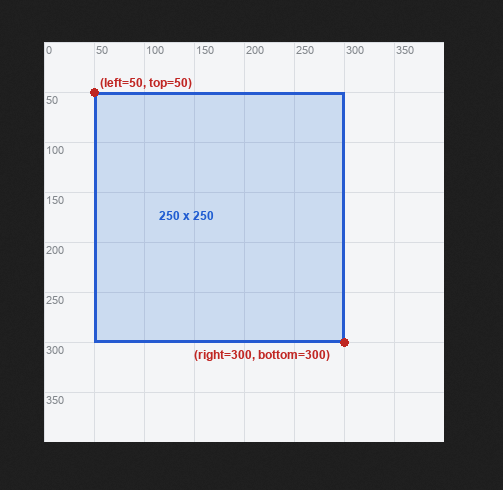
For example, "50,50,300,300" defines the region whose top-left corner is at (left=50, top=50) and whose bottom-right corner is at (right=300, bottom=300), a 250 × 250 rectangle.
- Java
- NodeJS
- Python
import java.util.HashMap;
import java.util.Map;
import org.openqa.selenium.JavascriptExecutor;

// x1,y1,x2,y2 -> left, top, right, bottom (pixels)
HashMap<String, String[]> ignoreByCoord = new HashMap<>();
ignoreByCoord.put("coordinates", new String[]{"847,185,1571,734"});

Map<String, Object> config = new HashMap<>();
config.put("screenshotName", "home");
config.put("ignoreDOM", ignoreByCoord);

((JavascriptExecutor) driver).executeScript("smartui.takeScreenshot", config);
// the 847,185 -> 1571,734 rectangle is excluded from the comparison
await driver.executeScript('smartui.takeScreenshot', {
  screenshotName: 'home',
  ignoreDOM: {
    coordinates: ['847,185,1571,734'], // left, top, right, bottom
  },
});
driver.execute_script("smartui.takeScreenshot", {
    "screenshotName": "home",
    "ignoreDOM": {
        "coordinates": ["847,185,1571,734"],  # left, top, right, bottom
    },
})
The origin the coordinates are measured from depends on fullPage: viewport-relative for a normal shot, full stitched-page-relative for a full-page shot. See Coordinate space.
2. Select a region instead of ignoring it (selectDOM)
Everything above works identically for selectDOM. Where ignoreDOM excludes a region, selectDOM restricts the comparison to only the given region(s). Both DOM selectors and coordinates are supported.
- Java
- NodeJS
- Python
// compare ONLY this rectangle
HashMap<String, String[]> selectByCoord = new HashMap<>();
selectByCoord.put("coordinates", new String[]{"0,0,1280,200"});
config.put("selectDOM", selectByCoord);

// ...or compare only the region of a matched element
HashMap<String, String[]> selectBySelector = new HashMap<>();
selectBySelector.put("cssSelector", new String[]{"#price-table"});
config.put("selectDOM", selectBySelector);
// compare ONLY this rectangle
config.selectDOM = { coordinates: ['0,0,1280,200'] };

// ...or compare only the region of a matched element
config.selectDOM = { cssSelector: ['#price-table'] };
# compare ONLY this rectangle
config["selectDOM"] = {"coordinates": ["0,0,1280,200"]}

# ...or compare only the region of a matched element
config["selectDOM"] = {"cssSelector": ["#price-table"]}
3. Coordinate space: viewport vs full page
Coordinates are interpreted as absolute pixel coordinates in the space of the produced screenshot image. The origin depends on the fullPage option of the screenshot:
fullPage | Captured image | Coordinate origin (0,0) |
|---|---|---|
false (default) | Viewport / element shot | Top-left of the captured viewport; y within the visible area. |
true | Stitched full-page shot | Top-left of the full stitched page; y increases down the entire scrollable page. |
So for a full-page screenshot, supply coordinates relative to the whole page (a region below the fold has a large top / bottom), not relative to the current viewport. Selector regions need no such consideration; they are resolved live against the DOM, so they land correctly in either mode.
4. Combine selectors and coordinates
Within a single ignoreDOM (or selectDOM) the two input modes are additive: all resolved regions are combined.
- Java
- NodeJS
- Python
Map<String, Object> ignore = new HashMap<>();
ignore.put("cssSelector", new String[]{".promo"});          // selector
ignore.put("coordinates", new String[]{"847,185,1571,734"}); // coordinates

config.put("ignoreDOM", ignore);
((JavascriptExecutor) driver).executeScript("smartui.takeScreenshot", config);
// both regions are ignored
config.ignoreDOM = {
  cssSelector: ['.promo'],         // selector
  coordinates: ['847,185,1571,734'], // coordinates
};
await driver.executeScript('smartui.takeScreenshot', config);
// both regions are ignored
config["ignoreDOM"] = {
    "cssSelector": [".promo"],          # selector
    "coordinates": ["847,185,1571,734"],  # coordinates
}
driver.execute_script("smartui.takeScreenshot", config)
# both regions are ignored
Validation and errors
Coordinates are validated at two levels. Note that only the format check happens on the hooks ingestion path; page-bounds elimination is a downstream comparison-engine behaviour, not part of the hooks request validation:
| Level | Where | Checks | On failure |
|---|---|---|---|
| Format | Hooks ingestion | A coordinates entry must parse to exactly four numeric components, all non-negative, with left < right and top < bottom. | The smartui.takeScreenshot call returns a clear 400 error and the screenshot is not taken at all (the whole call is rejected, not just the one region). |
| Page bounds | Downstream (comparison engine) | The rectangle lies inside the rendered page / viewport. | A rectangle that falls outside the page is handled downstream; it simply produces no ignore/select box. This elimination is performed by the comparison engine, not by the hooks request validation. |
Notes
- Scope: this applies to the Web Hooks path (Selenium
executeScript("smartui.takeScreenshot", ...)). RD Hooks and the CLI SDK already support these inputs. - Empty or mixed configs: a config containing only
coordinates(no selector) is honoured; it is not treated as "no DOM region." Selector and coordinate regions in oneignoreDOMare additive. - Identical to selector-based ignore: coordinate regions resolve to the same kind of ignored/selected box as selectors, so the comparison result matches an equivalent selector-based ignore.


 Chat with Us