Smart Locator Priority
Smart Locator Priority lets your organization define the order in which KaneAI should prefer supported locator strategies while authoring test cases in KaneAI.
This is useful when your application is more stable with one locator type over another and you want that preference applied consistently at the organization level.
What It Does
Smart Locator currently supports prioritizing these locator strategies:
- CSS selector
- XPath
- Full XPath
The locator type placed at the top of the list is given higher priority than the locator types below it.
For example:
- If CSS selector is placed above XPath, KaneAI will prefer CSS selector first.
- If XPath is moved to the top, KaneAI will prefer XPath first.
Why This Matters
Different applications behave better with different locator strategies.
You may want to adjust the default order if:
- your application generates more stable CSS selectors than XPath expressions
- your current pages rely more heavily on XPath-based resolution
- your team wants one consistent Smart Locator strategy across the organization
Where to Find It
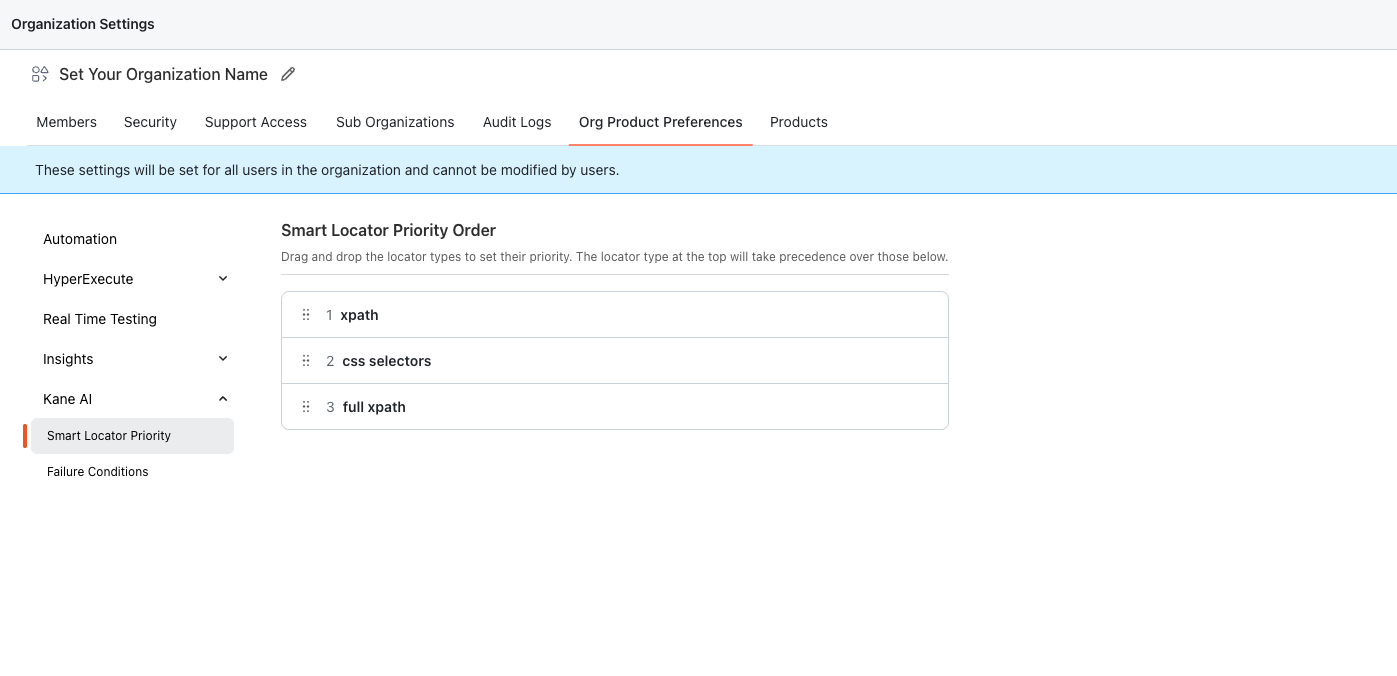
The following screen shows where the setting is located:
How to Configure Smart Locator Priority
- Open Organization Settings in TestMu AI.
- Navigate to Org Product Preferences.
- Expand the Kane AI section in the left navigation.
- Open Smart locator priority.
- Drag and drop the supported locator types into your preferred order.
- Keep the most preferred locator strategy at the top of the list.
Once updated, the new order becomes the organization-level Smart Locator preference for any newly authored or edited test cases in KaneAI.
The change in priority will not reflect in already authored test cases and will only be updated when a test step is authored or re-authored in KaneAI playground.
Best Practices
- Choose one order for your organization and avoid changing it too frequently.
- Validate the preferred strategy on a few representative KaneAI flows before standardizing it across teams.
- If locator behavior changes after a UI update in your product, review whether the current priority order is still appropriate.
Limitations
- This setting currently supports only the locator strategies shown in the UI.
- The priority order controls which locator type is preferred first; it does not replace the need for stable page structure and reliable element identification.

 Chat with Us
 Ask the Community