Perform Headless Browser Testing on Cloud Selenium Grid
TestMu AI allows you to run headless browser tests on its cloud-based Selenium Grid. This guide shows you how to enable and run headless browser testing on the TestMu AI platform.
Enabling Headless Browser Testing on TestMu AI
Set the headless desired capability to run tests without a graphical user interface.
For headless browser testing on TestMu AI, enable the desired capability for headless browsing. You can enable this capability using either of the two methods below:
Enable Headless Browser Testing on Desired Capabilities Generator
Visit the Desired Capabilities Generator. Under the Browser Specific Capabilities, find the toggle button to enable Headless browsing. Switch the button to true.

Enable Headless Browser Testing via Code
Add the headless capability directly in your test script code.
While writing the desired capabilities in your code, enable headless browser testing by adding the below syntax:
capabilities.setCapability("headless",true);
Below is the complete code for sample desired capabilities in various languages:
Java
DesiredCapabilities capabilities = new DesiredCapabilities();
capabilities.setCapability("browser", "Chrome");
capabilities.setCapability("version", "86");
capabilities.setCapability("platform", "MacOS Catalina");
capabilities.setCapability("build", "your build name");
capabilities.setCapability("name", "your test name");

// Capability setting to enable Headless browser testing
caps.setCapability("headless",true);
C#
DesiredCapabilities capabilities = new DesiredCapabilities();
capabilities.SetCapability("user","username")
capabilities.SetCapability("accessKey","access_key")
capabilities.SetCapability("build", "your build name");
capabilities.SetCapability("name", "your test name");
capabilities.SetCapability("platform", "MacOS Catalina");
capabilities.SetCapability("browserName", "Chrome");
capabilities.SetCapability("version","86.0");

// Capability setting to enable Headless browser testing
capabilities.setCapability("headless",true);
PHP
$capabilities = array(
		"build" => "your build name",
		"name" => "your test name",
		"platform" => "MacOS Catalina",
		"browserName" => "Chrome",
		"version" => "86.0",

		"headless" => true
		)
Ruby
capabilities = Selenium::WebDriver::Remote::Capabilities.new
capabilities["build"] = "your build name"
capabilities["name"] = "your test name"
capabilities["platform"] = "MacOS Catalina"
capabilities["browserName"] = "Chrome"
capabilities["version"] = "86.0",

capabilities["headless"] = true
JavaScript
var capabilities = {
		"build" : "your build name",
		"name" : "your test name",
		"platform" : "MacOS Catalina",
		"browserName" : "Chrome",
		"version" : "86.0",

		"headless" : true
	}
Python
capabilities = {
		"build" : "your build name",
		"name" : "your test name",
		"platform" : "MacOS Catalina",
		"browserName" : "Chrome",
		"version" : "86.0",

		"headless" : True
	}
Perform Headless Browser Testing on TestMu AI
Run a headless browser test using the TestNG framework in Java.
Below is an example to perform headless browser testing. For demo purposes, this uses the TestNG framework with Java.
package com.lambdatest;

import java.net.MalformedURLException;
import java.net.URL;
import org.openqa.selenium.By;
import org.openqa.selenium.remote.DesiredCapabilities;
import org.openqa.selenium.remote.RemoteWebDriver;
import org.testng.Assert;
import org.testng.annotations.AfterSuite;
import org.testng.annotations.BeforeSuite;
import org.testng.annotations.Test;

public class HeadlessAutomation {

	private static RemoteWebDriver driver;
	private static String Status="failed";

	@BeforeSuite
	public void setup() throws MalformedURLException {

		try {
			String username = System.getenv("LT_USERNAME");
			String authkey = System.getenv("LT_ACCESS_KEY");
			String hub = "@hub.lambdatest.com/wd/hub";

			DesiredCapabilities caps = new DesiredCapabilities();
			caps.setCapability("browser", "Chrome");
			caps.setCapability("version", "86");
			caps.setCapability("platform", "MacOS Catalina");
			caps.setCapability("build", "Headless Automation");
			caps.setCapability("name", "Headless Automation");
			caps.setCapability("network", true);
			caps.setCapability("visual", true);
			caps.setCapability("video", true);
			caps.setCapability("console", true);

			// Capability setting to enable Headless browsing
			caps.setCapability("headless",true);


			System.out.println("Desired Caps: " + caps);
			driver = new RemoteWebDriver(new URL("https://" + username + ":" + authkey + hub), caps);
		}
		catch(Exception e)
		{
			System.out.println(e);
		}
	}


	@Test
	public static void testAssertion() {

		try {
			driver.get("https://opensource-demo.orangehrmlive.com/"); //define the url

			String pageTitle = driver.getTitle();		//get the title of the webpage
			System.out.println("The title of this page is ===> " +pageTitle);
			Assert.assertEquals("OrangeHRM", pageTitle);	//verify the title of the webpage

			driver.findElement(By.id("txtUsername")).clear();//clear the input field before entering any value
			driver.findElement(By.id("txtUsername")).sendKeys("Admin");//enter the value of username
			driver.findElement(By.id("txtPassword")).clear();
			driver.findElement(By.id("txtPassword")).sendKeys("admin123");//enter the value of password
			driver.findElement(By.id("btnLogin")).click();		//click Login button
			System.out.println("Successfully logged in");
			Status = "passed";
		}
		catch(Exception e)
		{
			Status = "failed";
		}
	}

	@AfterSuite
	public void tearDown() {
		driver.executeScript("lambda-status=" + Status);
		driver.quit();
	}

}
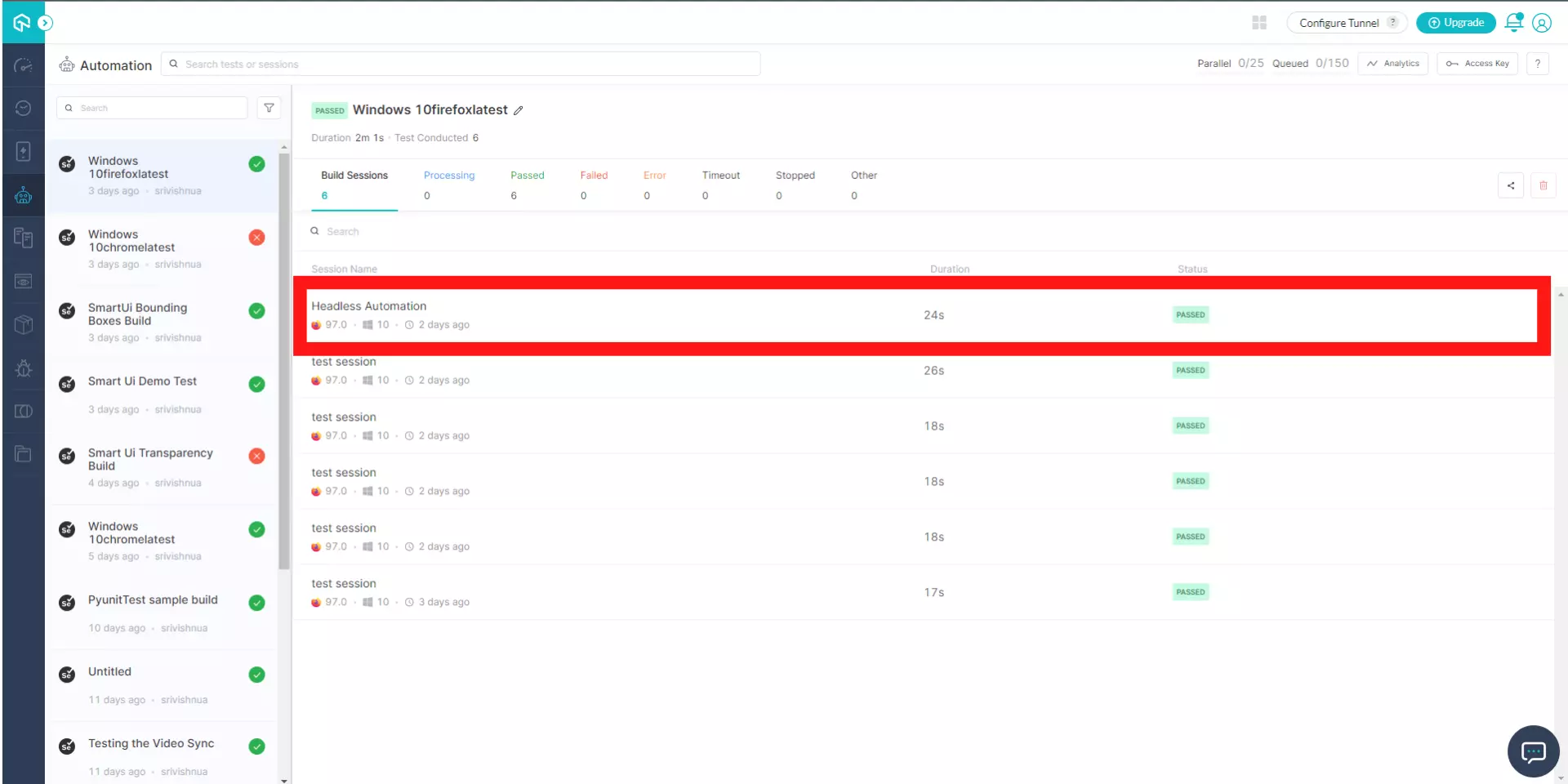
After you execute the above code, the test runs on TestMu AI successfully. View the status of the test on your Automation dashboard.
If you have any questions, contact our experts at 24/7 Customer chat support or mail us at [email protected]. Happy testing!

 Chat with Us
 Ask the Community