Defect Analysis and Prediction
Modern test automation generates thousands of results per day. Without intelligent analysis, teams waste significant time manually triaging failures, chasing flaky tests, and diagnosing root causes. TestMu AI's AI-powered defect analysis and prediction capabilities automatically classify, analyze, and surface actionable insights from your test execution data, helping you move from reactive debugging to proactive quality improvement.
This page provides an overview of the AI/ML-based capabilities available across the TestMu AI platform for defect analysis and prediction, and how they work together to improve test suite reliability.
How It Works
TestMu AI applies machine learning and AI models across your test execution history to:
- Detect: Identify flaky and unreliable tests automatically using execution pattern analysis
- Classify: Categorize failures by type (environment, script, application, network) using AI models
- Diagnose: Pinpoint root causes of failures using LLM-powered analysis
- Predict: Surface early warning signals through smart tags that flag tests trending toward failure
These capabilities work across Web Automation, App Automation, and HyperExecute.
Flaky Test Detection
Flaky tests, tests that produce inconsistent pass/fail results without any code change, are one of the biggest threats to test suite reliability. They erode team confidence in test results and waste time on false investigations.
TestMu AI uses machine learning algorithms to automatically identify flaky tests by analyzing historical execution patterns across your test runs.
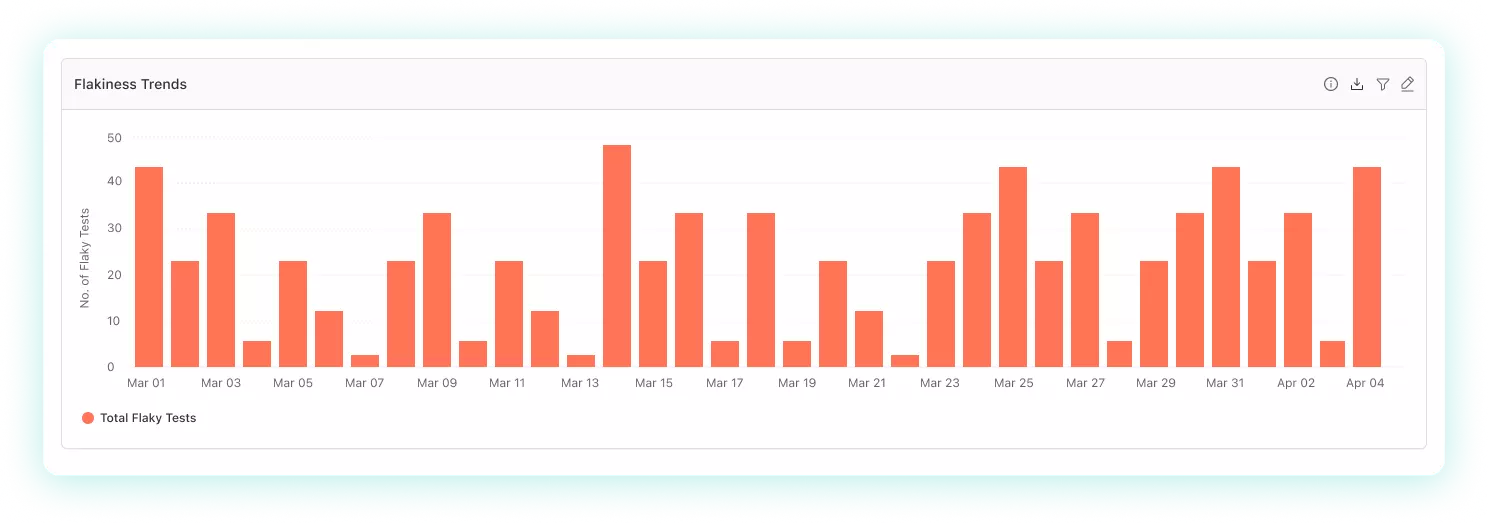
What It Does
- Analyzes test execution history to detect inconsistent pass/fail patterns
- Identifies the specific commands or steps within a test that cause flakiness
- Tracks flakiness trends over time (Passed, Failed, Flaky categorization)
- Helps distinguish between genuine failures and environmental noise
How to Use It
Flaky test detection is available in two places:
| Location | What You Get |
|---|---|
| Test Intelligence: Flaky Tests Detection | Deep-dive into individual flaky tests, flakiness sources, and command-level analysis |
| Insights: Flaky Tests Analytics | Dashboard widgets showing flakiness trends, distribution, and team-level patterns |
Failure Categorization AI
When tests fail, the first question is always: "Is this a real bug, a test script issue, or an environment problem?" Manually answering this across hundreds of failures is unsustainable.
TestMu AI's Failure Categorization AI automatically classifies test failures into categories based on execution data, environment parameters, browser/OS combinations, and failure signatures.
What It Does
- Automatically categorizes failures by type (application defect, script error, environment issue, etc.)
- Analyzes parameters like browser, OS, device, and failure patterns to determine category
- Helps teams prioritize: focus on application defects first, fix script issues separately
- Reduces manual triage time significantly
How to Use It
- Failure Categorization AI: Available in Insights dashboards for Web Automation, App Automation, and HyperExecute
- Error Categorization Report: Structured failure reports for HyperExecute jobs with multiple error types
Prerequisite: Add the remark capability in your test scripts to provide additional context to the AI model, which improves categorization accuracy.
AI Root Cause Analysis (AI RCA)
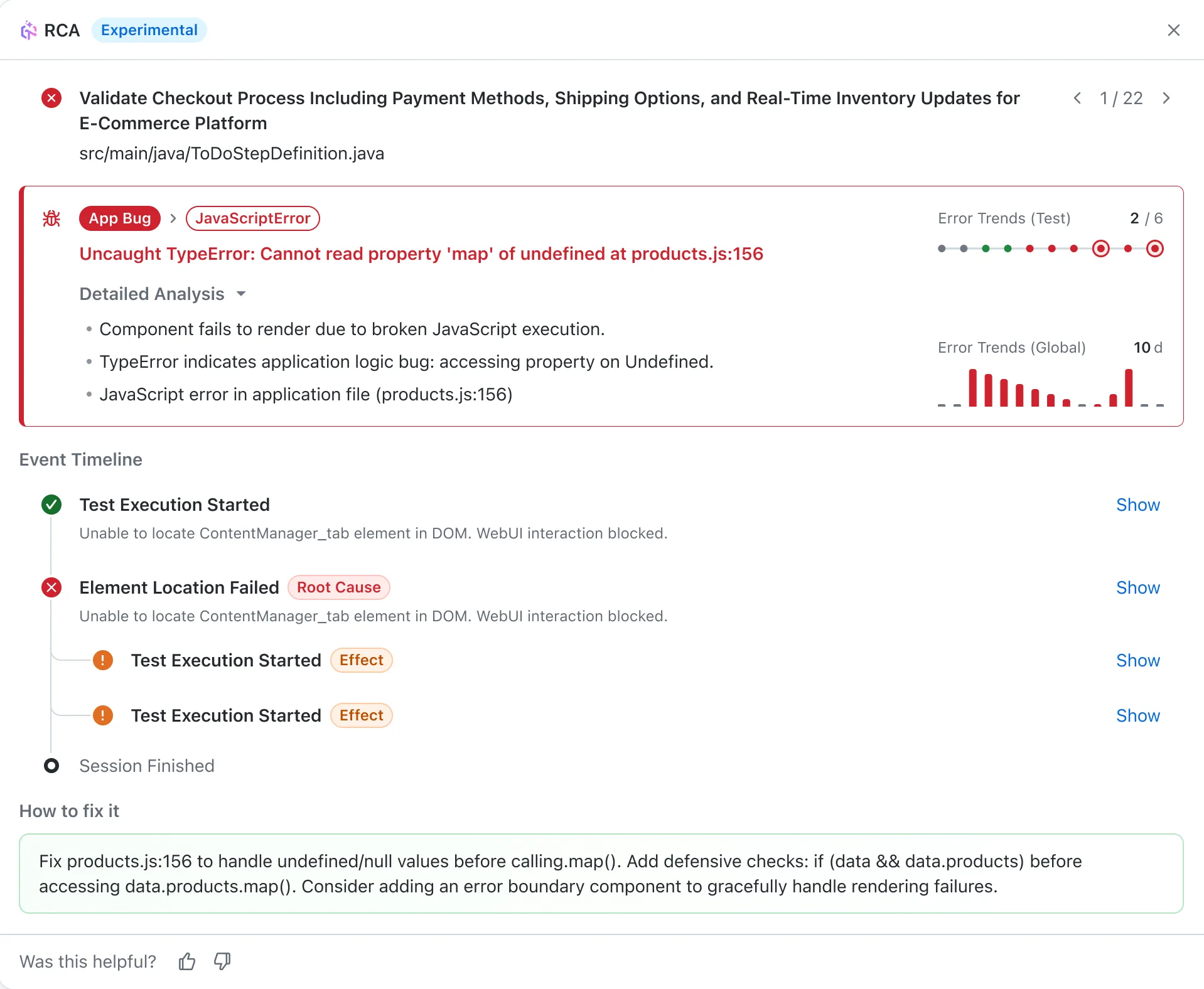
Once a failure is detected and categorized, the next step is understanding why it happened. TestMu AI's AI RCA uses LLM-powered analysis to automatically diagnose failed tests and provide actionable fix recommendations.
What It Does
- Analyzes failed test logs, screenshots, and execution data using advanced AI
- Distinguishes primary root causes from cascading symptoms
- Provides actionable fix recommendations, not just error descriptions, but specific steps to resolve
- Generates error timelines showing the chronological sequence of events leading to the failure
- Available across multiple surfaces for different use cases
Where It's Available
| Surface | Use Case | Details |
|---|---|---|
| Insights: AI RCA | Analyze any failed test from dashboards | LLM-powered, credits-based (15-25 credits per analysis) |
| HyperExecute: AI Native RCA | Automatic RCA for HyperExecute job failures | Integrated into job results, analyzes logs automatically |
| SmartUI: Visual RCA | Diagnose visual regression failures | Identifies underlying causes of visual mismatches |
Smart Tags
Smart Tags provide an early warning system by automatically labeling tests based on their execution patterns. Rather than waiting for tests to fail consistently, Smart Tags proactively surface tests that are trending in a concerning direction.
Available Tags
| Tag | What It Means | Why It Matters |
|---|---|---|
| Flaky | Inconsistent results across multiple executions | Unreliable signal, needs investigation or quarantine |
| Always Failing | Consistently failing across multiple executions | Likely a real defect or broken test, high priority |
| New Failures | Recently started failing after previously passing | Potential regression, investigate recent changes |
What It Does
- Automatically assigned by the system based on execution pattern analysis
- Visible on dashboard widget drilldowns in Insights
- Helps teams prioritize which failures to investigate first
- Surfaces regression signals early before they become widespread
How to Use It
- Smart Tags: Test Intelligence: Available in Insights dashboards, requires minimum 10 test runs
Putting It All Together
These capabilities are designed to work as a pipeline. Each stage feeds into the next:
VerifiedTest Execution
↓
Smart Tags (early warning: flaky, always failing, new failure)
↓
Flaky Test Detection (deep analysis of inconsistent tests)
↓
Failure Categorization AI (classify: app bug vs script vs environment)
↓
AI Root Cause Analysis (diagnose root cause + recommended fix)
Recommended Workflow
- Set up Insights dashboards with Flaky Tests and Failure Categorization widgets to monitor your test suite health continuously
- Review Smart Tags on drilldowns to catch early warning signals, especially "New Failures" which may indicate regressions
- Use Flaky Test Detection to identify and quarantine unreliable tests, improving the signal-to-noise ratio of your test results
- Apply AI RCA to diagnosed failures to get actionable fix recommendations without manually reading through logs


 Chat with Us