Mobile Web Automation Testing on Real Devices
Mobile web automation involves testing websites or web apps on real mobile devices like Android and iOS. Testing appearance and performance on a real device ensures that the test runs on real-world conditions, delivers better performance, and improves test coverage across devices.
TestMu AI allows you to perform mobile web automation via Appium on a wide range of real Android and iOS devices. You can test on mobile devices from OEMs like Samsung, Apple, Xiaomi, and more.
Prerequisites
Install Python and the Appium client library before running mobile web tests.
- Download the latest version of Python.
- Install the Appium dependency by running the following command from the CMD terminal.
pip install Appium-Python-Client
The above code installs the latest Python client library for Appium which only supports w3c : True capability.
Performing Mobile Web Automation on Real Devices
Pass the isRealMobile capability in your test scripts to run on a real device.
To test on a real mobile device, pass the below capability in your test scripts.
'isRealMobile': True
You can also add the capability using the Desired Capabilities Generator.
In the below Python test script, we take an example of our sample ToDo app. We check two checkboxes of the list and add another item to the list. The test runs on iPhone 11 with platform version iOS 13.
//todo.py

#!/usr/local/bin/python
# -*- coding: utf-8 -*-
import time
from appium import webdriver

desired_cap = {
  'w3c': True,
  'platformName': 'iOS',
  'platformVersion': '13',
  'deviceName':"iPhone 11",
  'nativeWebScreenshot':True,
  'build': 'Demo',
  'isRealMobile' : True,// real mobile device capability
  'console': True,
  'visual': True,
  'network': True,
  'tunnel' : False,
  "newCommandTimeout": 300
}

url = "https://LT_USERNAME:[email protected]/wd/hub"
driver = webdriver.Remote(desired_capabilities = desired_cap, command_executor = url)

driver.get("https://lambdatest.github.io/sample-todo-app/")
time.sleep(2)

list1 = driver.find_element_by_xpath("//input[@name='li1']")
list1.click()
time.sleep(1)

list2 = driver.find_element_by_xpath("//input[@name='li2']")
list2.click()
time.sleep(1)

inputfield = driver.find_element_by_id("sampletodotext")
inputfield.click()
inputfield.send_keys("item 1")
driver.hide_keyboard()
time.sleep(1)

driver.execute_script("document.getElementById('addbutton').click();")
time.sleep(1)

inputfield = driver.find_element_by_id("sampletodotext")
inputfield.click()
inputfield.send_keys("item 2")
driver.hide_keyboard()
time.sleep(1)

driver.execute_script("document.getElementById('addbutton').click();")
time.sleep(5)

driver.quit()
In the below test snippet, add your TestMu AI Username and TestMu AI Access Key. Get them from the TestMu AI dashboard. In the Hub URL, we added a beta prefix (mobile-hub.lambdatest.com/wd/hub).
url = "https://LT_USERNAME:[email protected]/wd/hub"
Execute the below command in the terminal to run the test.
python todo.py
Visit the TestMu AI Automation Dashboard to find the mobile web automation test details along with the REAL DEVICE (BETA) label as highlighted below.
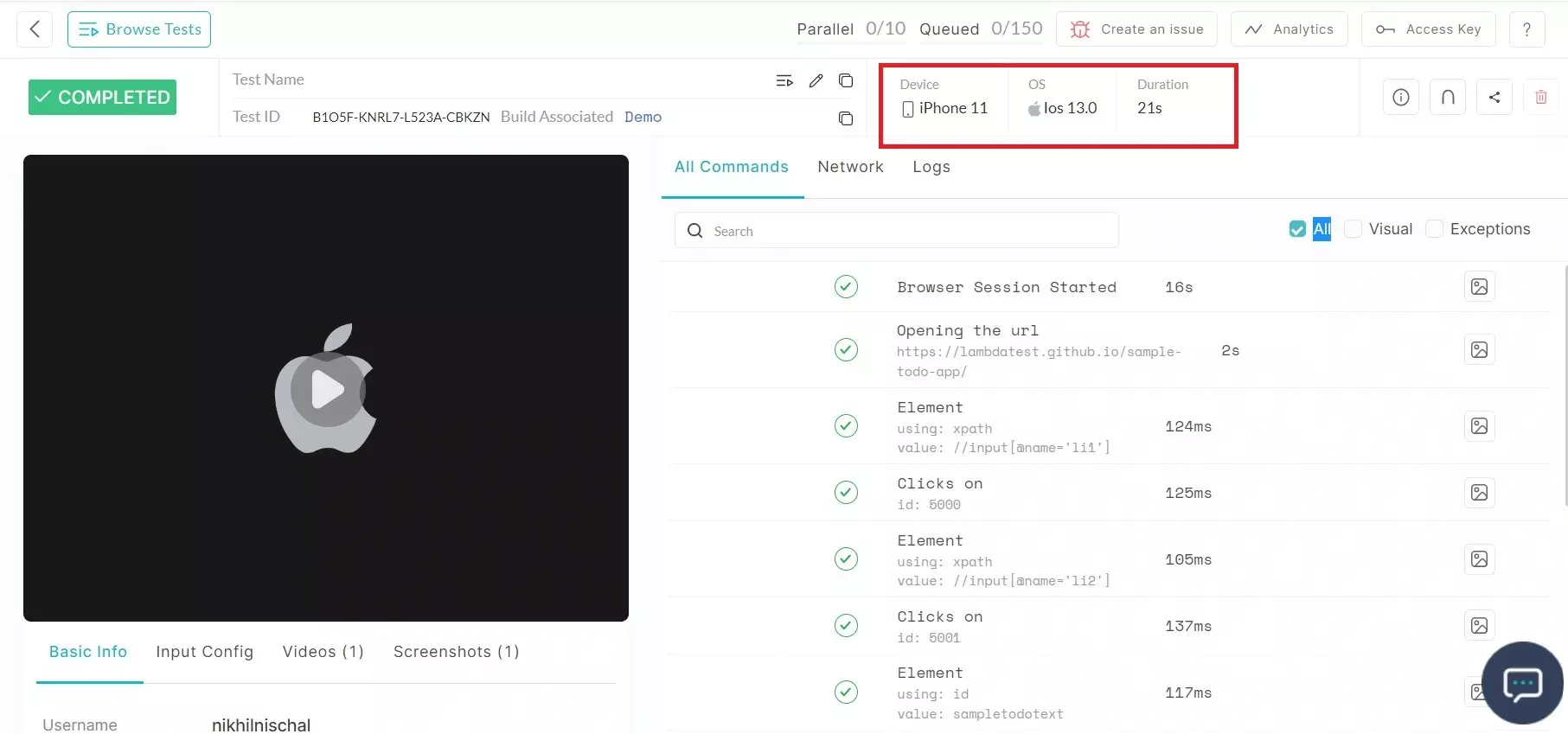
You have successfully executed the mobile web automation test on real devices. If you have questions or need additional information, reach out at our 24X7 Chat Support or mail us directly at [email protected].

 Chat with Us
 Ask the Community