Cypress Testing Using WebKit
WebKit is a web browser engine based on KHTML that displays and interacts with web pages. It is open-source and used by many web browsers like Apple's Safari and Google's Chrome.
TestMu AI lets you perform Cypress testing using WebKit, Safari's browser engine. By testing your web apps in WebKit, you can get an idea of how your website will run in Safari.
Prerequisites
Before we get started, make sure to clone the TestMu AI's sample Cypress Cloud repo, used in this document.  View on GitHub
You can run Cypress test in WebKit on the TestMu AI platform in a few simple steps:
- Clone the
LambdaTest-Cypress-CloudGitHub repo and navigate to the cloned directory.
git clone https://github.com/LambdaTest/Cypress-Cloud.git
cd Cypress-Cloud
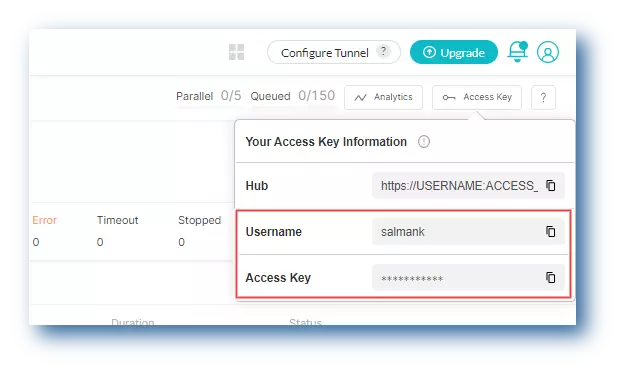
- To run Cypress tests in WebKit, set your TestMu AI username and access key in the environment variables. You can get them from the TestMu AI Automation Dashboard.
Windows
set LT_USERNAME="YOUR_LAMBDATEST_USERNAME"
set LT_ACCESS_KEY="YOUR_LAMBDATEST_ACCESS_KEY"
macOS/Linux
export LT_USERNAME="YOUR_LAMBDATEST_USERNAME"
export LT_ACCESS_KEY="YOUR_LAMBDATEST_ACCESS_KEY"
- Install Node.js version 12 or higher. You can download it from the official Node.js website.
Running Your First Test in WebKit
Following are the steps to run your first Cypress test in WebKit on the TestMu AI platform.
- Install the TestMu AI-Cypress CLI using the below command.
npm install -g lambdatest-cypress-cli
- Clone the Cypress kitchen sink repo using the following command.
- Cypress v10
- Cypress v9
# Clone the kitchen sink repo
git clone https://github.com/cypress-io/cypress-example-kitchensink.git

# Go to the cloned directory
cd cypress-example-kitchensink
# Clone the kitchen sink repo
https://github.com/cypress-io/cypress-example-kitchensink/tree/ab10094ef7b199ae7febafec413a0626414bcd3c

# Go to the cloned directory
cd cypress-example-kitchensink
Once you clone the kitchen sink repo, below will be the structure of your Cypress project.
- Cypress v10
app
...
cypress
|-- fixtures
|-- e2e
|-- support
cypress.config.js
...
- Install the npm dependencies by passing the below command.
npm install
- Create
lambdatest-config.jsonfile that contains configurations like auth, capabilities, test settings, etc. which need to be successfully executed at LambaTest.
Use init command to generate the sample configuration files.
lambdatest-cypress init
Once you run the above command, below is the project structure for the lambdatest-config.json file.
- Cypress v10
{
  "lambdatest_auth": {
     "username": "<Your LambdaTest username>",
     "access_key": "<Your LambdaTest access key>"
  },
  "browsers": [
     {
        "browser": "Webkit",
        "platform": "Windows 11",
        "versions": [
           "latest"
        ]
     },
     {
        "browser": "Webkit",
        "platform": "Windows 10",
        "versions": [
           "latest"
        ]
     }
      {
       "browser": "Webkit",
       "platform": "MacOS Monterey",
       "versions": [
          "latest"
       ]
    },
 {
       "browser": "Webkit",
       "platform": "MacOS Big sur",
       "versions": [
          "latest"
       ]
    },

 ],
  "run_settings": {
     "cypress_config_file": "cypress.config.js",
     "reporter_config_file": "base_reporter_config.json",
     "build_name": "build-name",
     "parallels": 1,
     "specs": "./*.cy.js",
     "ignore_files": "",
     "network": false,
     "headless": false,
     "npm_dependencies": {
        "cypress": "10.8.0"
        "playwright-webkit": "^1.28.1",
        "mochawesome": "7.0.1"

     }
  },
  "tunnel_settings": {
     "tunnel": false,
     "tunnel_name": null
  }
}
- Pass the below command to run the test.
lambdatest-cypress run
- Visit TestMu AI Automation dashboard to view your test results. The CLI also has a link to view the Cypress test build.
Testing Locally Hosted or Privately Hosted Projects
To tests locally hosted websites on the TestMu AI platform, you need to setup TestMu AI tunnel, and execute commands using the CLI, or Download UnderPass, our GUI based desktop app. Once you have the TestMu AI tunnel or Underpass set up and started, you can use Cypress to test locally hosted websites.
Now you need to activate the tunnel capability in the lambdatest-config.json file under the section "tunnel_settings" as shown below:
  "tunnel_settings": {
		"tunnel": true,
		"tunnel_name": "LT_Tunnel"
	}
You can provide the name of the TestMu AI tunnel as per your requirements.
Limitations
-
WebKit only supports the latest version.
-
The following dependencies must be in
lambdatest-config.jsonfile.
"npm_dependencies": {
   "cypress": "10.8.0",
   "playwright-webkit": "^1.28.1"
}
- Works only with Cypress v10.8.0.
- Supported on Windows - 11 and 10, and macOS - Monterey and Big Sur.

 Chat with Us
 Ask the Community