List of TestMu AI Cypress CLI Commands
The TestMu AI-Cypress CLI provides a set of commands to streamline and enhance your testing workflows on the TestMu AI platform. Below is a comprehensive list of supported commands and their usage.
General Syntax
To use any command in the TestMu AI-Cypress CLI, follow this basic syntax:
lambdatest-cypress <command> [options]
| Command / Arg | Purpose |
|---|---|
--help | To get information of all the commands that can be run |
init | To create an initial config file |
run | To run tests on TestMu AI |
build-info | To get information about the build |
build-stop | To stop all the tests in the build |
generate-report | To generate the test session report |
--vip, --vi-project | To set the smart ui project name. The acceptable data type is string |
--vib , --vi-build | To set the smart ui build name. The acceptable data type is string |
--vibase , --vi-base | To set that build as baseline for smart ui. The acceptable data type is boolean |
init command
The init command to generate a initial lambdatest configuration file.
lambdatest-cypress init
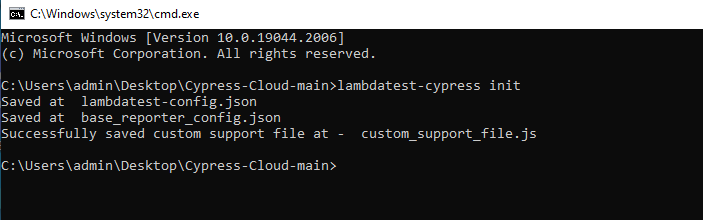
On running the above command, it will generate base_reporter_config.json,custom_support_file.js and lambdatest-config.json files.
-
base_reporter_config.json: This is the configuration file for mochawesome reporter, that TestMu AI uses to generate mochawesome reports which in turn is used to generate the commands section on the TestMu AI dashboard. For Cypress 10, the absence of this file may lead to the commands section not being visible on the dashboard. -
custom_support_file.js: By default, Cypress automatically captures screenshots when a test fails. For Cypress 10, in order to make the screenshot visible with the failed tests on our dashboard, we recommend you move and import this file as recommended. -
lambdatest-config.json: This file contains configurations like TestMu AI credentials, capabilities, run settings etc., that are required to run the test.
run command
For detailed examples of each Cypress flag, please visit our guide Configuring Cypress Test Execution.
To start running the test build, you can use the given-below command.
lambdatest-cypress run
Given below are the additional flags available with the run command.
| Flag | Purpose | Type |
|---|---|---|
--version | Show version number | Boolean |
--help | Show help | Boolean |
--ccf, --cypress-config-file | Path of the config file | String |
--user, --username | LambdaTest username | String |
--ak, --access_key | LambdaTest access key | String |
--lcf, --lambdatest-config-file | Path of the LambdaTest config file | String |
-s, --specs | Path of the spec file, directory, or pattern | String |
--env, --environment | Specify environment name | String |
--bn, --build-name | Set build name | String |
-t, --tags | Run tests with specific tags | String |
-p, --parallels | Number of parallel sessions | String |
--envs, --env-variables | Set environment variables before test execution | String |
--tun, --tunnel | Enable LambdaTest tunnel | String |
--tname, --tunnel_name | Set LambdaTest tunnel name | String |
--brs, --browsers | Run tests on specified browsers in format platform:browser:version | String |
--bi, --build-identifier | Set build identifier or build counter | String |
--if, --ignore_files | Files to ignore in project zip | String |
--sync, --sync-mode | Enable sync mode to wait for test completion | String |
--autostart, --tat | Enable tunnel auto start | String |
--headless, --headless-mode | Run tests in headless mode | Boolean |
--net, --network | Capture network logs | String |
--eof, --exit-on-failure | Exit with code 1 on failure | String |
--cy, --cypress_settings | Pass Cypress settings | String |
--geo, --geo_location | Pass geo country code | String |
--sof, --stop_on_failure | Stop other tests if any test in session fails | Boolean |
--ra, --reject_unauthorized | Reject self-signed certificates in external requests | Boolean |
--bt, --build-tags | Set build tags | String |
--sys-envs, --sys-env-variables | Set system environment variables during test run | String |
--envfl, --env-file | Path of .env file | String |
--npm-f, --npm-force | Force npm install | Boolean |
--npm-lpd, --legacy-peer-deps | Use legacy peer dependencies during npm install | Boolean |
--vip, --vi-project | Set Visual UI project name | String |
--vib, --vi-build | Set Visual UI build name | String |
--vibase, --vi-base | Set Visual UI baseline build | Boolean |
--res, --resolution | Set machine resolution | String |
--dp, --dedicated_proxy | Enable dedicated proxy | Boolean |
--npm_tun, --npm_via_tunnel | Install npm packages behind private VPN (increases build duration) | Boolean |
--md, --max_duration | Stop test if running longer than specified minutes | String |
--cmd_log, --command_log | Show command logs on dashboard | String |
--ret_fail, --retry_failed | Retry failed tests in a new build | Boolean |
--net_http2, --network_http2 | Capture HTTP2 network logs | Boolean |
--net_ws, --network_ws | Bypass WebSocket calls for network logs | Boolean |
--node18, --useNode18 | Use Node.js v18 for Cypress runtime | Boolean |
--nodeV, --useNodeVersion | Specify Node.js version for Cypress runtime | String |
--net_sse, --network_sse | Bypass SSE events for network logs | Boolean |
--cypress_accessibility, --accessibility | Enable accessibility testing for Cypress | Boolean |
--tz, --timezone | Set custom timezone in machine | String |
--reg, --region | Set data center region (e.g., us, eu, ap) | String |
--pC, --privateCloud | Set custom private cloud | String |
build-info command
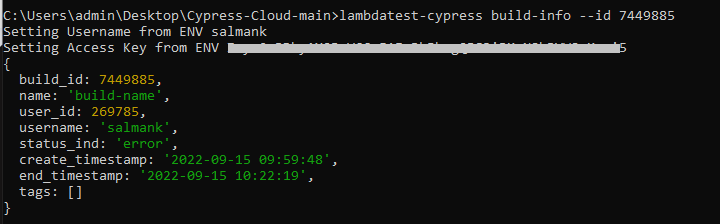
You can use the build-info command to get information on the build.
lambdatest-cypress build-info
Given below are the additional arguments available with the build-info command.
| Flag | Purpose | Type |
|---|---|---|
--id, --build-id | Build Identifier | String, Required |
--user, --username | Your TestMu AI username | String |
--ak, --access_key | Your TestMu AI access key | String |
build-stop command
You can use the build-stop command to stop all the test in the build.
lambdatest-cypress build-stop
Given below are the additional arguments available with the build-stop command.
| Flag | Purpose |
|---|---|
--id, --session_id | Identifies the session |
--sls, --stop_last_session | Stop the last test session |
--stop_last_session

--session_id


 Chat with Us
 Ask the Community