Dedicated Proxy - IP Whitelisting
This article will guide you on how does TestMu AI cloud access network restricted resources using a dedicated proxy server.
Dedicated Proxy is available under a separate paid plan. Once the plan is enabled and the Dedicated Proxy is whitelisted, you can use the dedicatedProxy: true capability for Automation Sessions. Dedicated Proxy is enabled by default for Manual App Live Testing.
Prerequisites
- Client network resources are publicly discoverable (clientapplication.private.com) but access is restricted to the dedicated proxy.
- The dedicated proxy IP needs to be whitelisted by the client’s network administrators.
IP whitelisting
IP whitelisting can help the client to have control over who has the access to resources hosted on their network. IP whitelist is an approved list of IP addresses or IP domains that have permission to access the resource domain. Reserved for only trusted users, it is only set and updated by the client network administrators. With dedicated proxy solution, only a single IP needs to be whitelisted which saves the hassle of whitelisting multiple IP ranges.
Dedicated Proxy Server of TestMu AI
TestMu AI provides a dedicated proxy server solution that can be whitelisted to provide access to the client’s network-restricted resources.
How does it work?
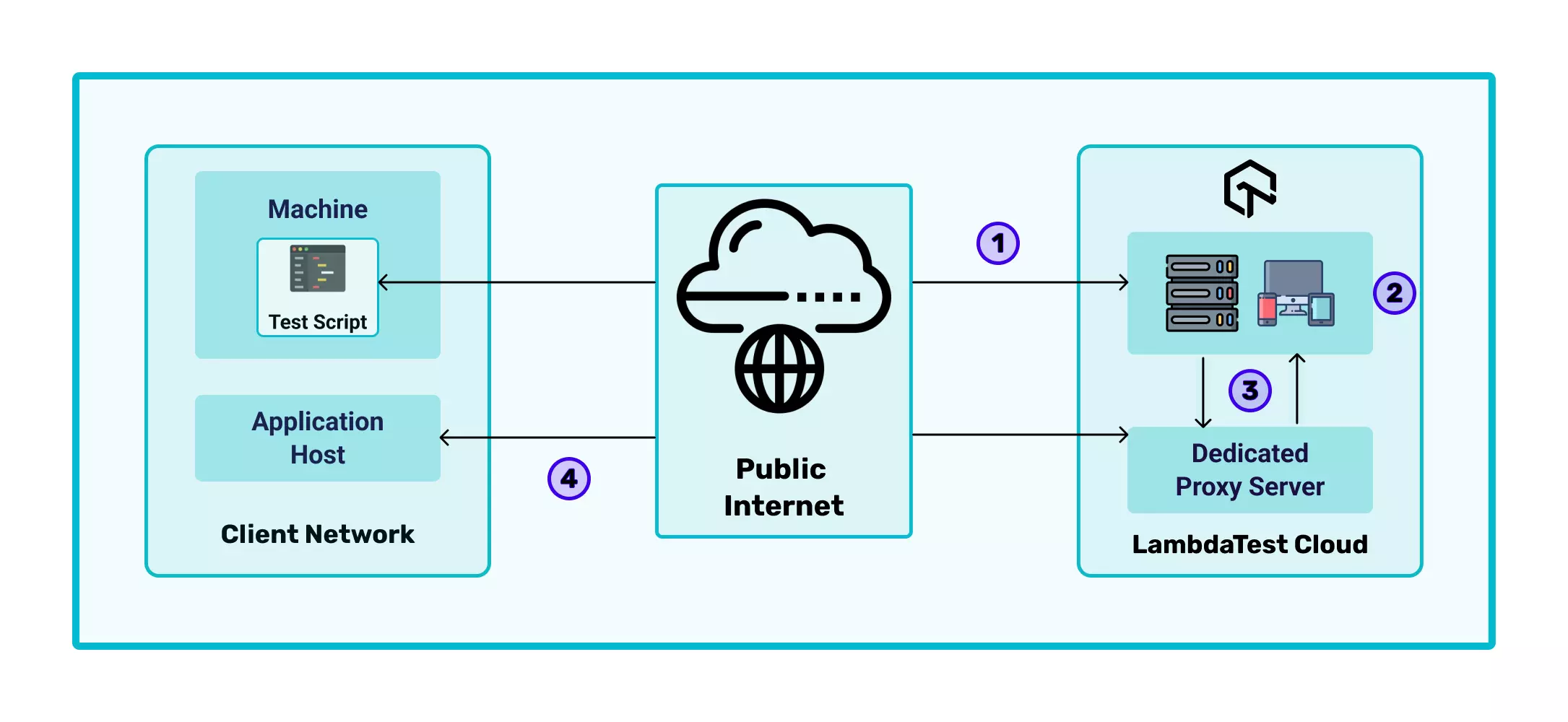
- The test script from the client network machine makes a call to the TestMu AI cloud platform to start the test session.
- TestMu AI cloud then allocates a device to the user with the specified capabilities to run the user’s test on the TestMu AI cloud.
- This allocated device makes all the network requests via the dedicated Proxy allocated to the client. The dedicated proxy checks whether resources can be attained through the public internet or need to be fetched from the client’s network.
- The dedicated proxy accesses the network restricted resources by reaching out to the client’s network via the whitelisted IP.
Dedicated Proxy is available under a separate paid plan. Once the plan is enabled and the Dedicated Proxy is whitelisted, you can use the dedicatedProxy: true capability for Automation Sessions. Dedicated Proxy is enabled by default for Manual App Live Testing.
That’s all! In case you have any questions or need any additional information, you could reach out at our [24X7 Chat Support] or mail us directly at support@testmuai.com.


 Chat with Us