Data Validation for Chat Agents With TestMu AI
A transcript shows what your chat agent said, not whether it was true. Data Validation checks the facts your agent states during a conversation, such as an order status, a price, a delivery date, or a stock count, against your own system of record. A claim like "your order has shipped" is checked against your live API instead of taken on faith.
You declare read-only API lookups and the facts each one is authoritative for. After every conversation, TestMu AI calls those endpoints and compares the values they return with what the agent said. Each fact gets its own verdict, with the agent's claim and your API's value side by side, in the same results as the scenario's other validation criteria. Data Validation is available for Chat agents.
When to Use Data Validation
- Your agent states values that an API can return, such as prices, order statuses, delivery dates, or quantities. A fluent answer built on a stale catalog or a guessed status reads well in a transcript and passes conversational grading. Data Validation catches it, because the comparison is against your API, not against how plausible the answer sounds.
- Your data changes over time. A scenario that hard-codes "the price is $8.99" fails as soon as the price changes, even when the agent states the current price. Data Validation fetches the expected values at evaluation time, so your tests stay correct as your data changes.
Prerequisites
- A Chat agent in TestMu AI. See Run a Chat Agent Test.
- A read-only API endpoint (GET or POST) that returns the authoritative values as JSON. It can be public, authenticated, or reachable through a TestMu AI tunnel.
- The facts your agent states that you want checked, such as prices, statuses, dates, or quantities.
- A test profile that carries the identifiers your lookups need, such as an order ID or customer ID, when they vary per scenario.
Create a Data Validation Config
A config is an answer key: one label for each fact the agent might state, and one JSONPath per label that points at the authoritative value in your API's response.
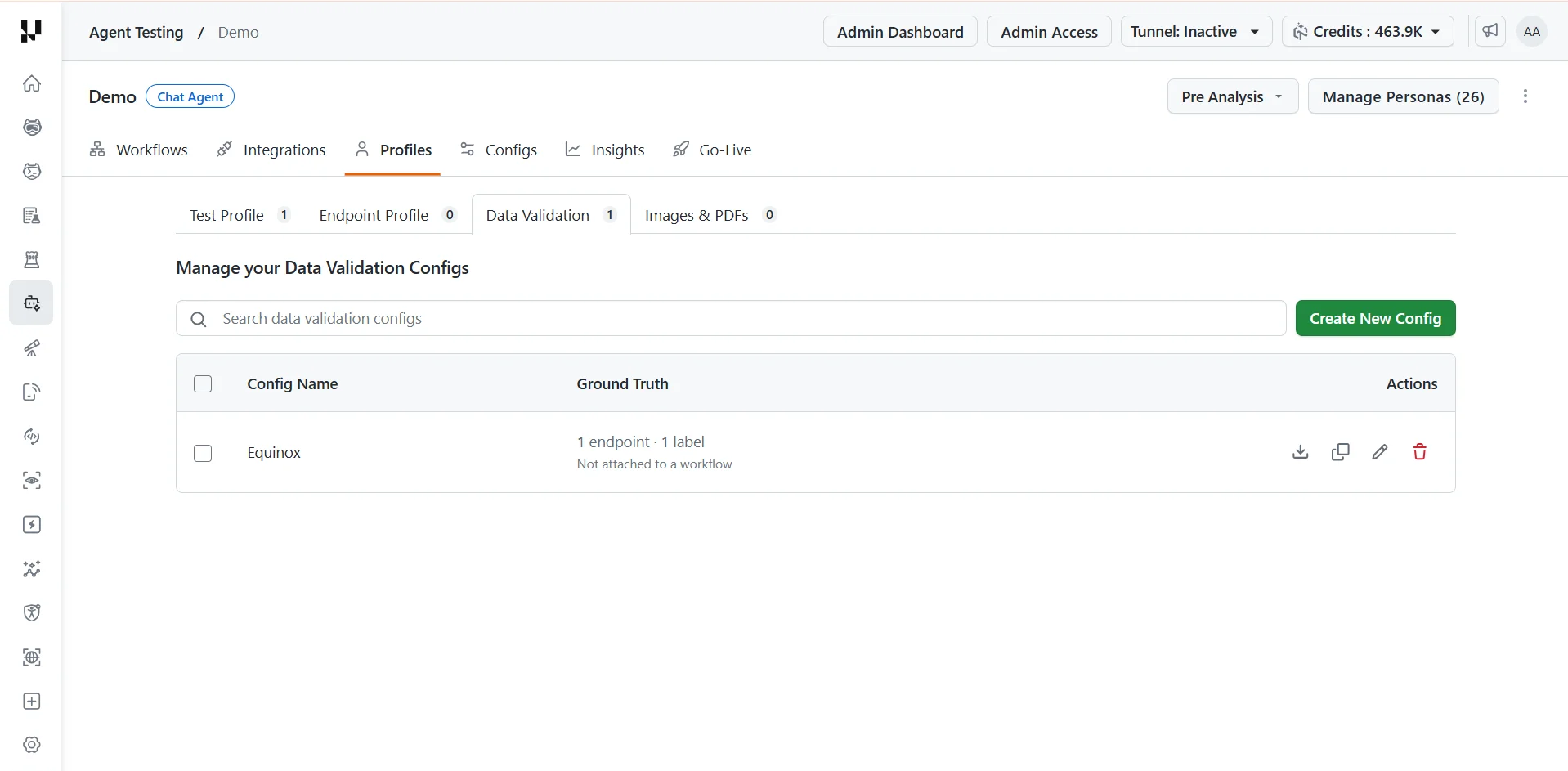
- Open your Chat agent, go to Profiles, then the Data Validation tab. Each config in the list shows how many endpoints and labels it has, and whether it's attached to a workflow.
- Select Create New Config.
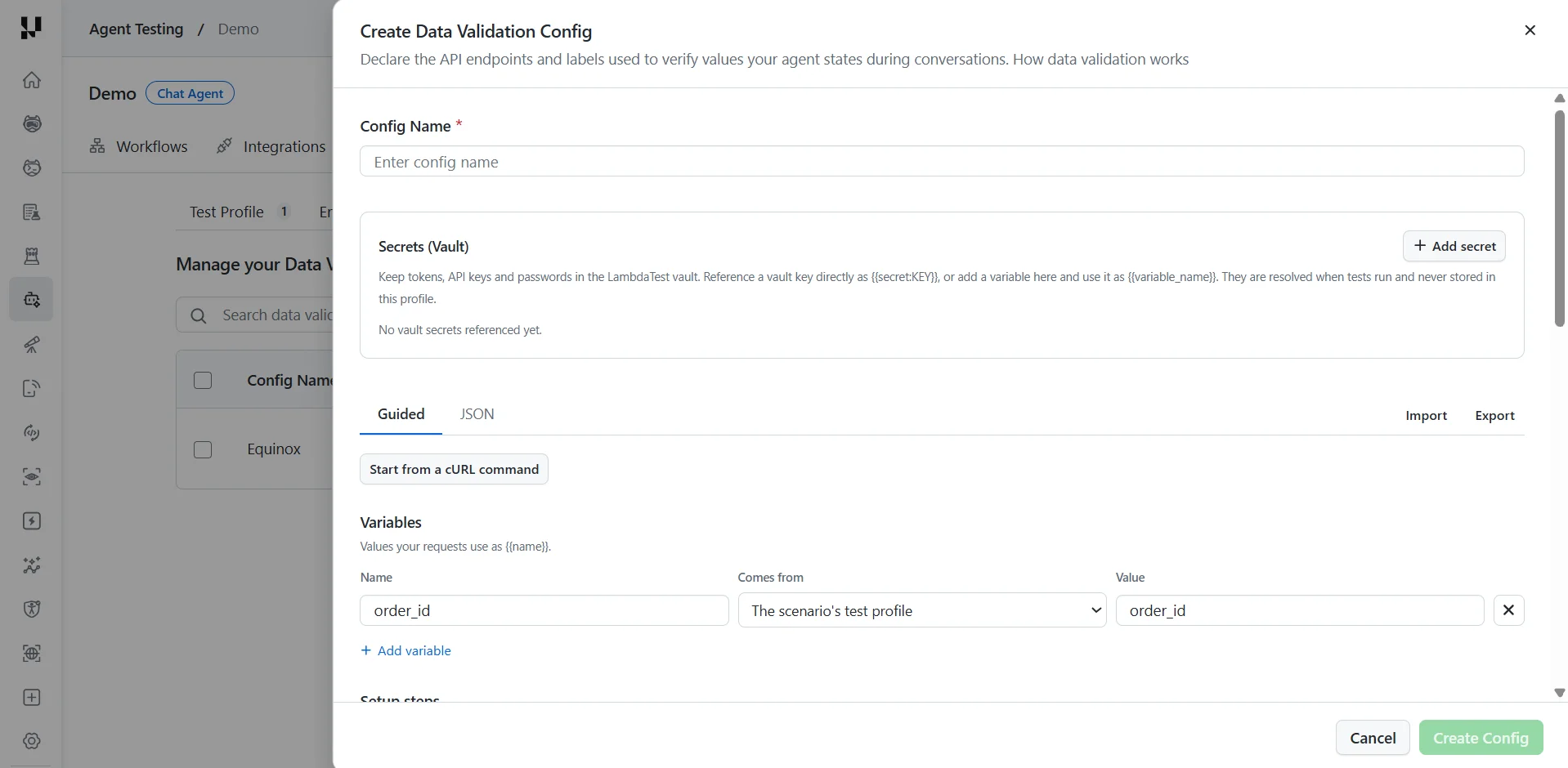
- In Config Name, name the config after what it checks, such as "Catalog Ground Truth" rather than "Config 3", so it's easy to pick when you attach it to a workflow.
- If your endpoints need a token or API key, select Add secret under Secrets (Vault), and reference it as
{{secret:KEY}}. Vault values resolve when tests run and are never stored in the config. - Fill in the variables, endpoints, and validation mappings. See the config reference for every field and an example.
- Guided builds the config as a form. To begin from a request you already run, select Start from a cURL command.
- JSON shows the whole config as one JSON object, for pasting or bulk edits.
- Import and Export load and save the config as a file.
- Test the config, then select Create Config.
- Attach the config to a workflow. A config runs only in the workflows it's attached to.
Config Reference
Every config is one JSON object, as shown on the JSON tab. The Guided tab sets the same fields through a form.
| Field | Required | Description |
|---|---|---|
description | Optional | What this config validates. |
variables | Optional | Named values resolved before any endpoint runs, then substituted into {{name}} tokens. |
endpoints | Required | One or more read-only lookups that fetch the ground-truth values. |
fetch_budget_seconds | Optional | Total time allowed across every endpoint call in one validation pass. |
Variables
Variables fill in the {{name}} tokens in endpoint URLs, headers, and bodies. Each variable's source sets where its value comes from. On the Guided tab, this is the Comes from column, such as The scenario's test profile.
source | Meaning |
|---|---|
static | A fixed literal value. |
secret | A key from the vault, for values such as API tokens. |
test_profile | A field read from the test profile driving the scenario, such as order_id or member_id. |
Sourcing identifiers from the test profile is the common case. Each scenario's profile supplies its own ID, so one config validates every scenario without edits.
Endpoints
Each entry in endpoints is one HTTP lookup. A config can hold several endpoints when a conversation touches more than one system of record, such as orders from one service and inventory from another.
| Field | Required | Description |
|---|---|---|
name | Required | Identifier for this lookup, shown in test results and fetch logs. |
url | Required | Request URL. It can contain {{variable}} tokens. |
method | Required | GET or POST. Endpoints are read-only by contract, never a write. |
headers | Optional | Extra headers such as auth tokens. Values can use {{variable}} tokens. |
timeout | Optional | Per-request timeout in seconds. |
expected_status | Optional | A list of status codes treated as success, for example [200]. |
validation_mappings | Required | The label and JSONPath pairs extracted from this endpoint's response. |
Validation Mappings
Each mapping pairs one fact with one path in its endpoint's response.
| Field | Required | Description |
|---|---|---|
label | Required | The name of the fact, such as sofa_price or order_status. Labels must be unique across the whole config. |
json_path | Required | JSONPath to the one authoritative value in the response, such as $.price or $.data.items[0].status. |
description | Optional | What the value means, plus any lookup quirks such as defaults or error codes. It helps the evaluation interpret the value correctly. |
Point each JSONPath at a single value. Where a path narrows a list, such as claims[0], only that first match is compared.
Example Config
This config reads the order ID from the test profile, looks up the order, and maps three facts the agent might state.
{
  "description": "Validate agent-stated order values against our system of record",
  "variables": [
    {
      "name": "order_id",
      "source": "test_profile",
      "profile_field": "order_id",
      "description": "Order ID from the test profile driving the conversation"
    }
  ],
  "endpoints": [
    {
      "name": "order_lookup",
      "url": "https://api.example.com/orders/{{order_id}}",
      "method": "GET",
      "timeout": 10,
      "expected_status": [200],
      "validation_mappings": [
        { "label": "order_status", "json_path": "$.status", "description": "Order status: processing, shipped, or delivered" },
        { "label": "order_total", "json_path": "$.total", "description": "Order total in dollars" },
        { "label": "delivery_date", "json_path": "$.delivery.estimatedDate", "description": "Estimated delivery date (YYYY-MM-DD)" }
      ]
    }
  ],
  "fetch_budget_seconds": 60
}
Test a Config Before You Save It
The Test this config panel in the config editor runs every endpoint immediately, so you catch a bad JSONPath or an unresolved {{variable}} before the config runs against a real conversation.
- In Test variables, enter one sample value per variable the config references, for example
{ "order_id": "ORD-12345" }. Use real, production-shaped IDs, so the dry run returns the same kind of response a run would. - Select Test.
The panel shows the resolved request, the HTTP status and duration, and each label's extracted value. Every label should report Fetched. A label that reports Path missing has a JSONPath that didn't resolve, and Fetch failed means the endpoint call itself failed. See Troubleshooting.
The dry run calls your endpoints directly and doesn't go through a tunnel. An API that's only reachable through your tunnel fails the dry run but still works during real runs.
Attach a Config to a Workflow
Data Validation runs per workflow, so attach a config to each workflow whose conversations you want checked.
- Open the workflow and go to Settings, then the Data Validation section.
- Under Attached config, choose the config.
Different workflows can attach different configs, and one config in the project can be marked Default to show the intended choice. To stop data validation for a workflow, choose None (data validation off). Deleting a config has the same effect on every workflow it was attached to. In both cases, the rest of the evaluation is unchanged.
What Happens During a Run
After each scenario's conversation ends, TestMu AI runs the attached config:
- It resolves the config's variables, mostly from the scenario's test profile.
- It calls each endpoint and extracts every mapped label's value.
- The evaluation checks each statement the agent made about those facts against the values and produces one validation criterion per label.
The fetch is fail-safe. If an endpoint is down, times out, or a path doesn't resolve, the affected labels are reported as Cannot verify with the reason, and the conversation's evaluation still completes.
Review Data Validation Results
Open a scenario result and go to the Validation Criteria tab. Data validation criteria appear alongside the scenario's own criteria, each tagged with a purple Data Validation chip, and count toward the same pass counts and compliance percentage. So one score reflects both how the agent conversed and whether its facts were right.
| Verdict | Meaning |
|---|---|
| Pass | Every statement the agent made about this fact matches your API's value. |
| Fail | The agent contradicted your API's value at least once. |
| Cannot verify | The fact never came up in the conversation, or the ground-truth value couldn't be fetched. The reason is shown either way. |
Matching is semantic, not character by character: "$49.99" matches 49.99, "shipped" matches a status of SHIPPED_IN_TRANSIT, and "arriving early next week" matches a delivery date early the following week. A statement that contradicts your API fails the criterion, however fluently it's worded.
Expand a criterion to see its evidence: the transcript quote, Agent stated next to Ground truth (from your API), the endpoint and JSONPath the value came from, and the message where the claim was made. Start with failed criteria. For example, an agent that quotes $12.99 from an outdated catalog while your API returns $8.99 gives a flawless conversation and a failed price criterion.
Tips
- Labels are the contract. Name them clearly, such as
sofa_pricerather thanvalue1, and keep them stable once a config is in use. - One value per JSONPath. Point each mapping at a single scalar. In the mapping's
description, note what happens when a list is empty or a variable is unset. - List every success status.
expected_statusis a list, so include every status you treat as success, such as[200, 204]. - Use read-only endpoints only. Never point a lookup at an endpoint that changes state. A value that changes when you read it can't serve as ground truth.
- Budget for the whole pass.
fetch_budget_secondscaps all endpoint calls together, so set it above the sum of your slowest endpoints' timeouts.
Troubleshooting
| Situation | What to do |
|---|---|
| A label reports Path missing in the dry run | Check the JSONPath against a real response body. Paths are case-sensitive, and arrays are zero-indexed. |
| A label reports Fetch failed in the dry run | Check the URL, the auth headers, and that every {{variable}} has a test value. If the API is tunnel-only, expect the dry run to fail and check it in a real run instead. |
| Results show Cannot verify with a fetch error | The endpoint was unreachable or slow during the run. Check its health and the timeout and fetch_budget_seconds values. |
| Results show Cannot verify with "not discussed" | The agent never stated that fact in the conversation. This is expected for facts outside the scenario's scope. |
| A criterion fails but the agent looks right | Expand it and compare Agent stated with Ground truth (from your API). If the ground truth is wrong, fix the mapping or the source data. |
| No data validation criteria appear | On the Data Validation tab, a config that shows Not attached to a workflow doesn't run. Attach it under the workflow's Settings, then Data Validation. |
Security
- Endpoints are restricted to read-only GET and POST lookups. TestMu AI never writes to your systems.
- Keep tokens and API keys in the vault and reference them as
{{secret:KEY}}. Vault values resolve when tests run, are never stored in the config, and are redacted from logs and fetch results. - Requests to internal and cloud-metadata addresses are blocked.
- Use dedicated, least-privilege API credentials for validation lookups, and rotate them according to your organization's security policy.
Related TestMu AI Guides
- See how to test a chat agent step by step.
- See how to connect a chat agent over its API.
- See every feature and metric by agent type.
 Chat with Us