C# with Playwright: Running Your First Test
Learn how to use Playwright with C# to automate web application testing across real browsers and operating systems on TestMu AI cloud platform.
Prerequisites
- You can use your own project to configure and test it. For demo purposes, we are using the sample repository.
Download or clone the code sample for the Playwright C# from the TestMu AI GitHub repository to run the tests.
 View on GitHub
git clone https://github.com/LambdaTest/playwright-sample.git
cd playwright-sample
cd playwright-csharp
- Install the npm dependencies.
npm install
- A TestMu AI Username and Access key. You can get it from your TestMu AI Profile section. Don't have an account, sign up for free.
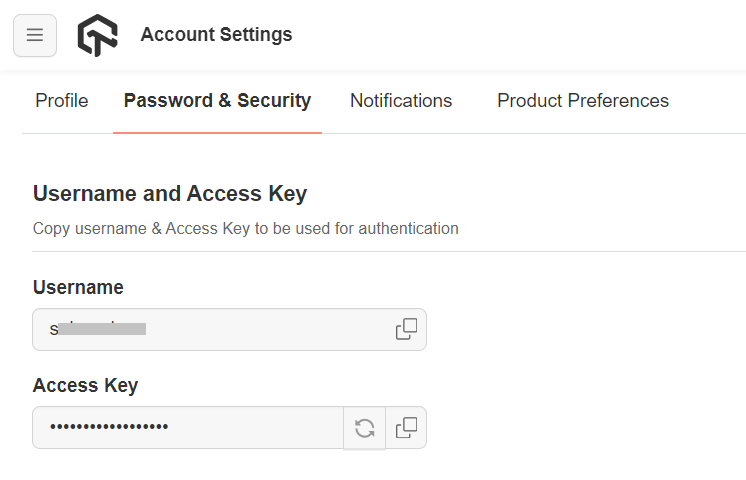
- To run Playwright tests, set your TestMu AI Username and Access key in the Environment Variables.
Run your Playwright tests with C#
Navigate to the PlaywrightTestSingle.cs file in the playwright-csharp directory.
using Microsoft.Playwright;
using System.Threading.Tasks;
using System;
using System.Collections.Generic;
using Newtonsoft.Json;

class PlaywrightTestSingle
{
    public static async Task main(string[] args)
    {
        using var playwright = await Playwright.CreateAsync();

        string user, accessKey;
        user = Environment.GetEnvironmentVariable("LT_USERNAME");
        accessKey = Environment.GetEnvironmentVariable("LT_ACCESS_KEY");

        Dictionary<string, object> capabilities = new Dictionary<string, object>();
        Dictionary<string, string> ltOptions = new Dictionary<string, string>();

        ltOptions.Add("name", "Playwright Test");
        ltOptions.Add("build", "Playwright C-Sharp tests");
        ltOptions.Add("platform", "Windows 10");
        ltOptions.Add("user", user);
        ltOptions.Add("accessKey", accessKey);

        capabilities.Add("browserName", "Chrome");
        capabilities.Add("browserVersion", "latest");
        capabilities.Add("LT:Options", ltOptions);

        string capabilitiesJson = JsonConvert.SerializeObject(capabilities);

        string cdpUrl = "wss://cdp.lambdatest.com/playwright?capabilities=" + Uri.EscapeDataString(capabilitiesJson);

        await using var browser = await playwright.Chromium.ConnectAsync(cdpUrl);
        var page = await browser.NewPageAsync();
        try {
          await page.GotoAsync("https://www.bing.com");
          await page.Locator("[aria-label='Enter your search term']").ClickAsync();
          await page.FillAsync("[aria-label='Enter your search term']", "LambdaTest");
          await page.Keyboard.PressAsync("Enter");
          var title = await page.TitleAsync();

          if (title.Contains("LambdaTest"))
          {
            // Use the following code to mark the test status.
            await SetTestStatus("passed", "Title matched", page);
          }
          else {
            await SetTestStatus("failed", "Title not matched", page);
          }
        }
        catch (Exception err) {
          await SetTestStatus("failed", err.Message, page);
        }
        await browser.CloseAsync();
    }

    public static async Task SetTestStatus(string status, string remark, IPage page) {
        await page.EvaluateAsync("_ => {}", "lambdatest_action: {\"action\": \"setTestStatus\", \"arguments\": {\"status\":\"" + status + "\", \"remark\": \"" + remark + "\"}}");
    }
}
- Pass the below command in the terminal:
dotnet build
- To run the test, pass the below command:
dotnet run single
Note: To run sessions on custom devices with emulation, run dotnet run iphonetest or dotnet run ipadtest.
View your test results
Go to the TestMu AI Web Automation Dashboard to see your Playwright C# test results.
Using the Playwright Agent Skill with TestMu AI
The playwright-skill is a part of TestMu AI Skills that guide AI coding assistants in generating production-ready test automation.
The playwright-skill package includes:
Verifiedplaywright-skill/
├── SKILL.md
└── reference/
├── playbook.md
└── advanced-patterns.md
It provides structured guidance for:
- Project structure and setup
- Dependency configuration
- Local execution
- TestMu AI cloud execution
- Debugging patterns
- CI/CD integration
Installing Playwright Agent Skill
Install a Playwright Agent Skill using the command below:
Verified# Clone the repo and copy the skill you need
git clone https://github.com/LambdaTest/agent-skills.git
cp -r agent-skills/playwright-skill .claude/skills/
# Or for Cursor / Copilot
cp -r agent-skills/playwright-skill .cursor/skills/
Note: If you prefer installing all available framework skills instead of only playwright-skill, clone the repository directly into your tool's skills directory (for example, .claude/skills/, .cursor/skills/, .gemini/skills/, or .agent/skills/).


 Chat with Us