IPsec Site-to-Site VPN Setup Guide
TestMu AI supports connectivity via IPsec Site-to-Site VPN (S2S VPN) for clients who need to test web applications hosted on internal/private networks that are not publicly accessible. This allows TestMu AI cloud infrastructure to reach your privately hosted test environments directly over an encrypted, authenticated tunnel — just as if both networks are on the same LAN.
An IPsec Site-to-Site VPN creates a permanent, encrypted tunnel between your network gateway and TestMu AI cloud, enabling secure access to internal staging environments, development servers, and private applications without exposing them to the public internet.
What is IPsec Site-to-Site VPN?
An IPsec Site-to-Site (S2S) VPN creates a permanent, encrypted tunnel between two network gateways, allowing devices on both networks to communicate securely as if they were on the same Local Area Network (LAN).
Key Concepts
- Gateway-to-Gateway: Unlike remote access VPNs (user-to-device), S2S VPN connects entire networks. It does not require software installation on individual test machines.
- Persistence: The tunnel is "always on," automatically re-establishing connection if interrupted.
- Technology: It utilizes the IPsec suite, specifically IKEv2 for secure key exchange and ESP in Tunnel Mode for data encapsulation and encryption.
- Use Case: It enables TestMu AI cloud nodes to access private URLs (e.g.,
http://192.168.10.5/myapporhttp://internal.company.com) that are not accessible via the public internet.
Network Architecture
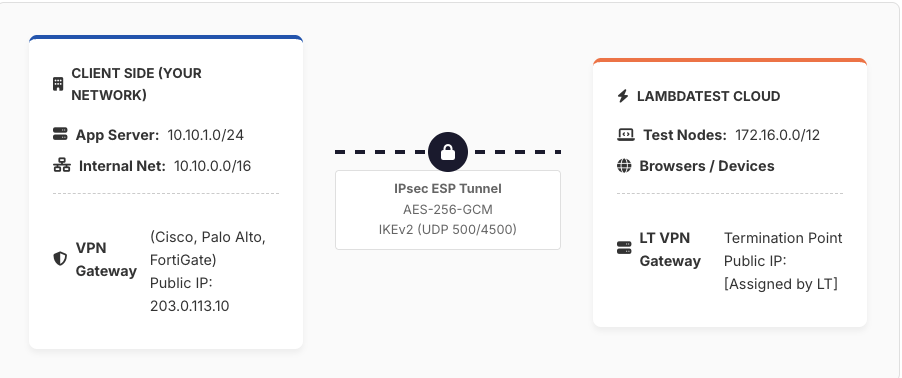
The diagram below illustrates the secure connection between your internal network and TestMu AI's cloud infrastructure.
Traffic Flow Steps
- TestMu AI test node initiates HTTP request to internal URL (e.g.,
http://10.10.1.50). - Traffic is routed to TestMu AI VPN Gateway based on routing table.
- VPN Gateway encapsulates packet in IPsec ESP Tunnel Mode (encrypted).
- Encrypted packet traverses the public internet to Client's Public IP.
- Client's VPN Gateway decrypts the packet (ESP decapsulation).
- Request is forwarded to the internal web server.
- Response follows the reverse path back to the test node.
IPsec Protocol Suite
IPsec Overview
IPsec (RFC 4301) secures IP communications. For S2S VPNs, we use Tunnel Mode, which encapsulates the entire original IP packet within a new IP packet, protecting both the payload and the original header.
IKEv2 (RFC 7296)
Internet Key Exchange Version 2 is responsible for negotiation and authentication.
- Phase 1 (IKE_SA_INIT): Negotiates cryptography (DH group, encryption) and generates keying material.
- Phase 2 (IKE_AUTH): Authenticates peers and establishes Child SAs for traffic.
- Ports: UDP 500 (Initial), UDP 4500 (NAT Traversal).
ESP (RFC 4303)
Encapsulating Security Payload provides confidentiality (encryption) and integrity. It operates as IP Protocol 50.
NAT Traversal (NAT-T)
Standard ESP cannot pass through NAT devices. RFC 3948 solves this by encapsulating ESP packets inside UDP packets on port 4500. This is automatically detected and negotiated during IKEv2 setup.
Recommended Security Parameters
| Parameter | Recommended Value | Notes |
|---|---|---|
| IKE Version | IKEv2 | IKEv1 is deprecated |
| Encryption (Phase 1) | AES-256-GCM or AES-256-CBC | NIST SP 800-77r1 approved |
| Encryption (Phase 2) | AES-256-GCM | Preferred AEAD cipher |
| Integrity (Phase 1) | HMAC-SHA-384 | SHA-1 is deprecated |
| Diffie-Hellman Group | Group 14 (Min) / Group 20 (Preferred) | Groups < 14 are insecure |
| PFS | Enabled | Perfect Forward Secrecy |
| SA Lifetime (Phase 1) | 28800 seconds (8 hours) | Standard enterprise setting |
| SA Lifetime (Phase 2) | 3600 seconds (1 hour) | Renegotiate frequently |
| DPD | Enabled | Dead Peer Detection |
Firewall / Port Requirements
The following ports must be permitted on your external firewall between the Client Gateway Public IP and the TestMu AI Gateway IP.
| Protocol | Port | Direction | Purpose |
|---|---|---|---|
| UDP | 500 | Bidirectional | IKE/ISAKMP Negotiation |
| UDP | 4500 | Bidirectional | NAT-Traversal & ESP Encapsulation |
| IP Proto 50 | N/A | Bidirectional | ESP (If no NAT is present) |
| TCP/UDP | 80, 443 | Client → TestMu AI | Allowed Test Traffic (HTTP/HTTPS) |
S2S VPN vs. SSH Tunnel Comparison
| Feature | S2S IPsec VPN | TestMu AI SSH Tunnel |
|---|---|---|
| Connectivity | Gateway-to-Gateway (Permanent) | Client-Initiated (Session-based) |
| Client Software | None (Router Config) | Requires LT Binary/App |
| Scope | Entire Network/Subnets | Local Machine only |
| Best For | Enterprise / Permanent Staging | Ad-hoc / Dev Testing |
Client Coordination
Setting up an IPsec Site-to-Site VPN is NOT a self-service process. It requires configuration on your organization's edge firewalls/routers.
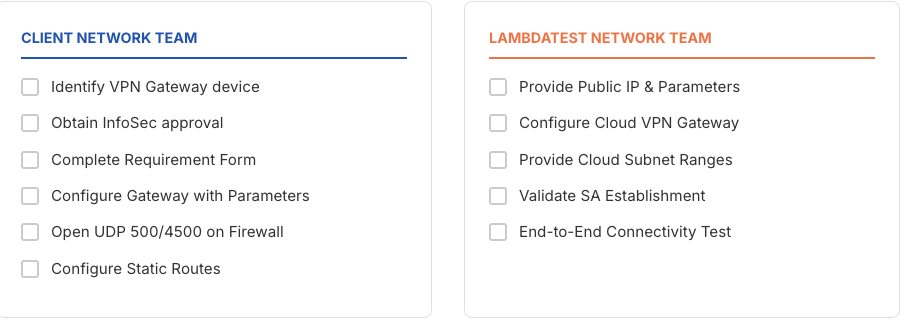
Required Actions by Client Team
- Gateway Configuration: Configure on-premise device (Cisco, Fortinet, Palo Alto, etc.) with provided parameters.
- Firewall Rules: Permit UDP 500/4500 from TestMu AI IP.
- Routing: Add static routes directing traffic for TestMu AI subnets into the tunnel.
- Security Approval: Obtain internal change management approval.
Timeline: Typical setup takes 3–10 business days depending on internal client approvals.
S2S VPN Requirement Gathering
Please provide the following details to your Network Team and share with TestMu AI support to initiate the setup process.
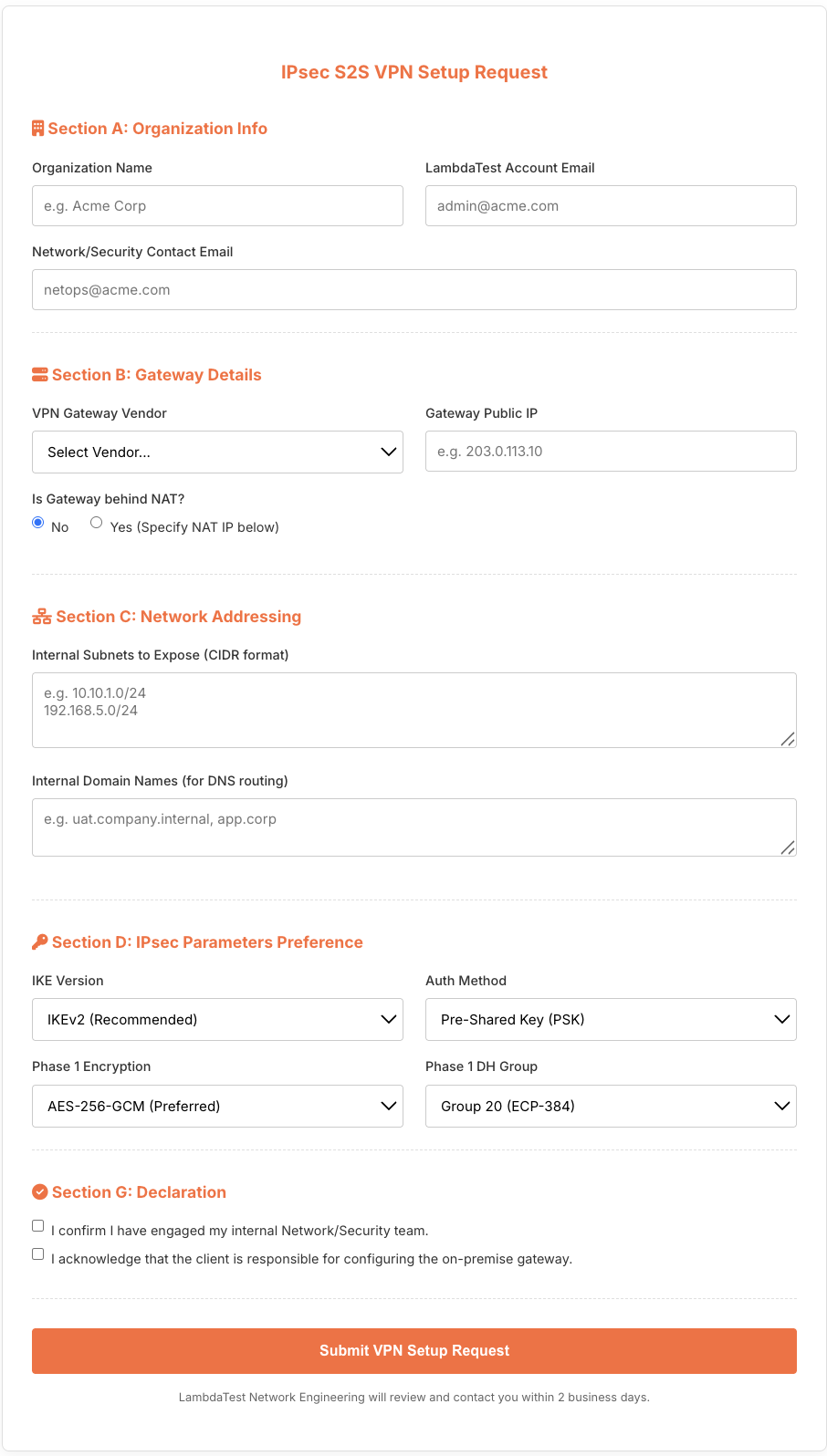
Contact TestMu AI support at [email protected] with the above details to initiate the VPN setup process. Our Network Engineering team will review and contact you within 2 business days.
Implementation Checklist
Troubleshooting
| Issue | Possible Cause | Resolution |
|---|---|---|
| Tunnel not establishing | Firewall blocking UDP 500 | Ensure UDP 500 is open bidirectionally |
| IKE Auth Failed | PSK mismatch | Verify Pre-Shared Key matches exactly |
| TS_UNACCEPTABLE | Subnet mismatch | Verify Traffic Selectors (subnets) match on both sides |
| Tunnel Up, No Traffic | Missing Route | Add route for TestMu AI subnet via tunnel interface |
| Drops Frequently | NAT Timeout | Enable NAT-T keepalives; check DPD |
References & Standards
- RFC 4301: Security Architecture for the Internet Protocol (IPsec)
- RFC 7296: Internet Key Exchange Protocol Version 2 (IKEv2)
- NIST SP 800-77 Rev. 1: Guide to IPsec VPNs
- FIPS 140-3: Security Requirements for Cryptographic Modules
For VPN setup assistance, contact: [email protected]

 Chat with Us
 Ask the Community