Puppeteer Testing With CodeceptJS
Learn how to run your Puppeteer tests with CodeceptJS across real browsers and operating systems on the TestMu AI platform.
Prerequisites
- You can use your own project to configure and test it. For demo purposes, we are using the sample repository.
Sample repo
Download or clone the code sample for the Puppeteer Codecept from the TestMu AI GitHub repository to run the tests.
 View on GitHub
git clone https://github.com/LambdaTest/puppeteer-sample.git
cd puppeteer-sample
cd puppeteer-codecept
- Install the npm dependencies.
npm install
- If you are running Codecept for the first time, run the below command:
npm install codeceptjs puppeteer --save
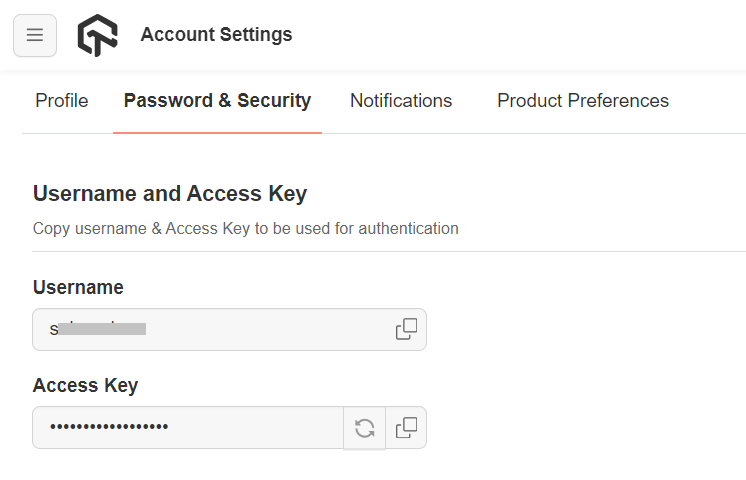
- To run Puppeteer tests with CodeceptJS, set your TestMu AI username and access key in the environment variables. Click the Access Key button at the top-right of the Automation Dashboard to access it.
Windows
Verifiedset LT_USERNAME="YOUR_LAMBDATEST_USERNAME"
set LT_ACCESS_KEY="YOUR_LAMBDATEST_ACCESS_KEY"
macOS/Linux
Verifiedexport LT_USERNAME="YOUR_LAMBDATEST_USERNAME"
export LT_ACCESS_KEY="YOUR_LAMBDATEST_ACCESS_KEY"
Running Tests Using CodeceptJS
Test Scenario: The below test script searches TestMu AI on DuckDuckGo and verifies the website title.
- Navigate to the
codecept.conf.jsfile in thepuppeteer-codeceptdirectory.
const { setHeadlessWhen } = require('@codeceptjs/configure');

// turn on headless mode when running with HEADLESS=true environment variable
// export HEADLESS=true && npx codeceptjs run
setHeadlessWhen(process.env.HEADLESS);

const caps_chrome = {
	browserName    : 'Chrome',
	browserVersion : 'latest',
	'LT:Options'   : {
		platform   : 'Windows 10',
		build      : 'Sample Puppeteer-Codecept',
		name       : 'Puppeteer-Codecept test on Chrome',
		resolution : '1366x768',
		user       : process.env.LT_USERNAME,
		accessKey  : process.env.LT_USER_KEY,
		network    : true
	}
};

const caps_edge = {
	browserName    : 'MicrosoftEdge',
	browserVersion : 'latest',
	'LT:Options'   : {
		platform   : 'Windows 10',
		build      : 'Sample Puppeteer-Codecept',
		name       : 'Puppeteer-Codecept test on Edge',
		resolution : '1366x768',
		user       : process.env.LT_USERNAME,
		accessKey  : process.env.LT_USER_KEY,
		network    : true
	}
};

exports.config = {
  tests: './specs/*.spec.js',
  output: './output',
  helpers: {
    Puppeteer: {
      chrome: {
        browserWSEndpoint : `wss://cdp.lambdatest.com/puppeteer?capabilities=${encodeURIComponent(JSON.stringify(caps_chrome))}`,
        "ignoreHTTPSErrors": true
      }
    }
  },
  include: {
    I: './steps_file.js'
  },
  bootstrap: null,
  mocha: {},
  name: 'codeceptjs-example',
  plugins: {
    pauseOnFail: {},
    retryFailedStep: {
      enabled: true
    },
    tryTo: {
      enabled: true
    },
    screenshotOnFail: {
      enabled: true
    }
  }
}
- Now pass the below command to run your test.
npx codeceptjs run
- Visit the TestMu AI Web Automation Dashboard to see your test results.


 Chat with Us