Version 1.140-0
Test Muting
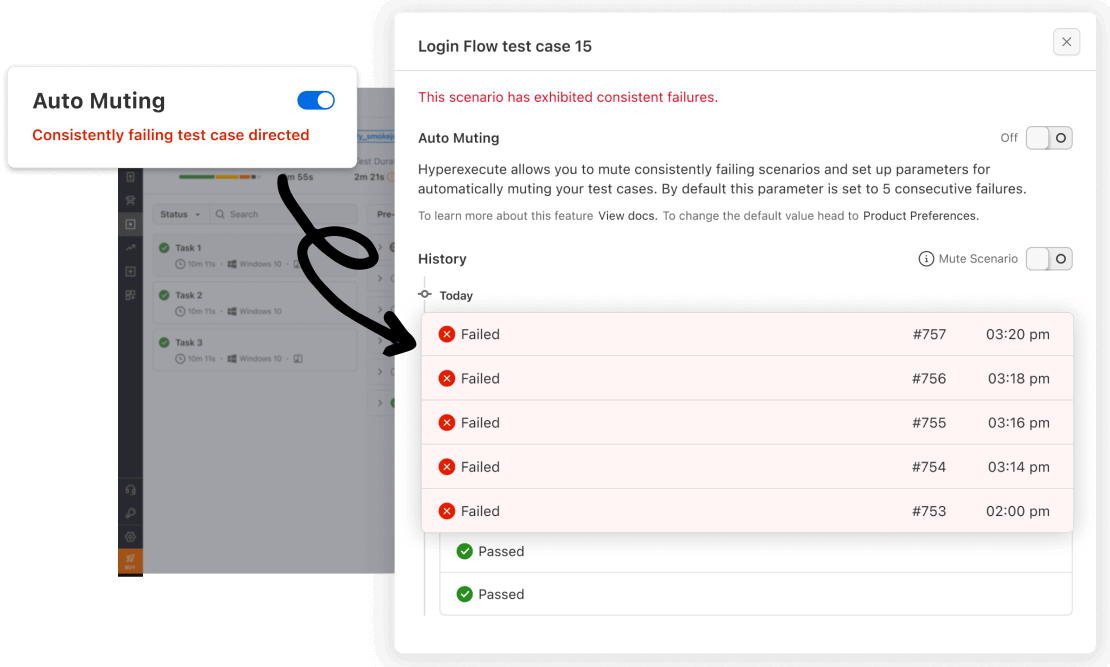
Test Muting is a new feature designed to enhance test efficiency and effectiveness by allowing users to temporarily disable specific test cases. This feature proves particularly useful for skipping consistently failing or irrelevant tests, streamlining test runs and enabling a sharper focus on crucial results.
Key Benefits
-
Improved Test Efficiency and Effectiveness: By eliminating the execution of unnecessary or problematic tests, Test Muting streamlines test runs, conserving valuable time and resources.
-
Reduced Noise in Test Results: By filtering out irrelevant or consistently failing tests, Test Muting provides a clearer picture of the overall test suite's performance, facilitating more informed decision-making.
-
Faster Feedback on HyperExecute Jobs: By streamlining test runs, Test Muting accelerates the feedback cycle on HyperExecute jobs, enabling testers to identify and address issues promptly.
-
Customizable Threshold Number to Mute Tests: Users can tailor Test Muting to their specific needs by setting a custom threshold for automatically muting tests based on consecutive failures.
-
Manual Mute/Unmute of Specific Test Cases: Users retain complete control over Test Muting, with the ability to manually mute or unmute specific test cases as needed.
For detailed instructions on utilizing Test Muting, including automatic and manual muting and unmuting of test cases, please refer to the comprehensive Test Muting documentation.

 Chat with Us
 Ask the Community