 Decode AI-Powered Quality Engineering from AI & QA Leaders,Register for Free!

Next-Gen App & Browser Testing Cloud
Trusted by 2 Mn+ QAs & Devs to accelerate their release cycles

Mobile Game Testing: A Complete Guide
In this blog, learn everything about mobile game testing. Explore tools, techniques, and best practices to ensure flawless experience across mobile devices.

Zikra Mohammadi
January 11, 2026
The mobile gaming industry is growing, so ensuring a smooth game experience is essential. Issues with the user interface, game mechanics, character controls, in-game physics, etc., can lead to user drop-offs and, ultimately, revenue loss.
This is where mobile game testing is crucial. It ensures that your games are tested on multiple mobile devices and operating systems. From finding bugs to optimizing gameplay, it ensures that you offer a high-quality game experience and that your mobile app stands out from the crowd.
In this blog, we’ll explore what is mobile game testing and why it matters.
What Is Mobile Game Testing?
Mobile game testing is the process of determining whether a mobile game meets the desired quality standards and delivers a seamless playing experience. This process identifies bugs related to functionality, compatibility, and performance on various devices and operating systems.
Additionally, it involves testing game-specific elements like mechanics, balance, and progression systems, as well as evaluating content quality and engagement. This involves various game testing techniques so that issues can be identified and fixed for a better game experience.
Why Is Mobile Game Testing Important?
Mobile game testing is important for delivering high-quality games that meet user expectations. Without proper testing, even the most innovative games will fail to attract and retain the target audience, which can impact reputation and revenue growth.
Let’s look at why running mobile game tests is important:
- Mobile game testing identifies critical bugs resulting in crashes, freezes, or gameplay errors that can impact the user’s gaming experience. Early bug detection helps developers resolve these issues before the game reaches users.
- With countless device models and operating system versions, testing ensures the game works seamlessly on all target platforms. It avoids issues like distorted graphics or unresponsive controls on specific devices.
- Mobile game testing ensures the game is optimized for performance under high user loads or low device resources (CPU, GPU, RAM, battery). This minimizes lag and ensures stable gameplay.
- Mobile games often involve in-app purchases, user data, and multiplayer interactions. Therefore, testing security aspects helps identify vulnerabilities and ensure secure transactions and fair gameplay.
- App stores have strict guidelines for games, and non-compliance can lead to rejections. Testing ensures the game meets these requirements, accelerating its time to market.

Note: Test your mobile games across 5000+ real devices. Try TestMu AI Today!
Mobile Game Testing Techniques
Mobile game testing incorporates various techniques to address the challenges and requirements of game development. Each method targets specific areas, ensuring the game meets quality standards and delivers a seamless player experience.
Let’s look at each technique:
- Functional Testing: It focuses on testing the game’s core functionalities like mechanics, controls, menus, and other features players interact with. It also looks for issues like missing buttons or in-game actions that don’t work as intended.
- Compatibility Testing: It ensures the game runs seamlessly on different devices, operating systems, screen sizes, and input devices like keyboards or controllers.
- Usability Testing: It validates the user interface, ensuring ease during gameplay. It includes checking how buttons, menus, or icons are placed, facilitating seamless and intuitive navigation during the game.
- Visual Testing: It tests the graphical elements of the game to ensure they meet quality standards and enhance user engagement. This ensures that the animation, textures, and color scheme are correct on any resolution or device.
- Localization Testing: It ensures the game functions as intended for a specific region or language. This includes testing translations, culturally relevant visuals, and local formats for things like currency or dates.
- Performance Testing: It checks how the game performs under specific conditions, like varying workloads, stress levels, or resource constraints. The aim is to identify and address performance bottlenecks to ensure stable gameplay.
- Recovery Testing: It evaluates how the game bounces back from unexpected issues, like crashes or network failures. Testers deliberately inject anomalies to see if features like autosave or crash recovery work.
- Soak Testing: It involves running the game for an extended period to catch issues that only appear over time. Testers leave the game on for hours or even days, monitoring for memory leaks or slowdowns. This helps identify issues that might not show up in short testing sessions.
- Combinatorial Testing: It involves testing different combinations of inputs to ensure everything works together. For example, testers might explore how different character choices, game settings, or difficulty levels interact.
- Compliance Testing: It ensures that the game complies with platform-specific guidelines (Android and iOS) and regulatory requirements so that there won’t be any delays or rejections. This involves verifying compatibility with app store policies, age ratings, and regional content regulations.
- Security Testing: It checks how the game protects against threats like data breaches or hacking. This includes validating aspects like login mechanisms, data encryption, and others.
- Beta Testing: It involves letting real users play the game and share their feedback. This process often highlights issues testers might overlook, helping to fine-tune the game and make it more engaging.
How to Perform Mobile Game Testing?
Now, let’s look at the steps to perform mobile game testing:
- Create a Test Plan: Planning forms the foundation of rigorous mobile game testing by defining objectives for evaluating functionality, compatibility, and performance across various environments.
- Set Up a Test Environment: In this phase, testers set up an environment for test execution. This includes selecting the target platforms, devices, network conditions, and right game testing frameworks and tools.
- Run the Tests: The test execution phase is where the actual testing takes place. Various mobile game testing techniques are applied to assess different aspects of the game.
- Prepare Test Reports: Once testing is complete, testers document their findings in the reporting phase. They categorize identified issues based on severity (critical, major, or minor), and include their logs.
- Resolve Bugs and Issues: In this phase, developers work to resolve the issues identified during testing. This involves fixing bugs, optimizing performance, and making necessary updates.
- Perform Regression Testing: After fixing bugs and issues, it’s important to perform regression testing to ensure the game remains stable after fixes and updates. Testers re-execute all test cases to confirm that no new issues have been introduced and that existing features still function properly.
Creating a game testing plan also involves analyzing various game elements, including storyboards, characters, and the architectural aspects shaping the game.
Mobile Game Testing Tools
To ensure high-quality mobile gaming experiences, developers and testers rely on a suite of tools to identify bugs, optimize performance, and make usability improvements. These enable teams to deliver games that run seamlessly across diverse devices under different conditions.
TestMu AI
TestMu AI is an AI-powered test execution platform that provides a cloud-based environment for mobile app testing. You can test mobile games on Android and iOS devices through its real device cloud.
It supports both manual and automated testing and works with popular mobile testing frameworks like Appium, Espresso, and XCUITest. With features like geolocation testing and network throttling, TestMu AI helps you mimic real-world conditions, ensuring your games run smoothly across various environments.

Appium
Appium has been a go-to choice for automating mobile application testing, including games. Supporting platforms like Android and iOS, Appium allows testers to write tests in popular programming languages such as Java and Python.
With Appium, you can even test touch interactions, gestures, and gameplay mechanics. Its ability to integrate effortlessly into CI/CD pipelines makes it ideal for teams aiming to automate repetitive tests and streamline development cycles.
But, when it comes to testing mobile games based on Unity or Unreal Engine, Appium faces certain limitations due to the way these engines render graphics and handle interactions. However, with Appium 2.0, you can hook tools like AltUnity Tester to test your Unity-based mobile games.
Unity Test Framework (UTF)
The Unity Test Framework (UTF) is a tool for testing Unity-based mobile games. It has features like Edit Mode and Play Mode tests for functionality and behavior validation of games. With Unity Test Framework (UTF), you can perform automated game testing, simulate mobile inputs, test game performance, and ensure stability using assertions and Unity Profiler.
Automation Test Framework in Unreal Engine
The Automation Test Framework in Unreal Engine lets you automate game testing. This includes running various types of tests like unit, feature, and content stress tests.
It is built in C++ programming language and works directly within core modules of Unreal Engine. However, it isn’t suited for pure unit testing. For pure unit testing, you can consider the Low-Level Tests (LLTs) framework in Unreal Engine.
GameBench
GameBench is a game testing tool that comes with features such as automated and performance testing. It provides detailed insights into key metrics like frame rates, CPU and GPU usage, memory consumption, and battery performance during gameplay.
This helps testers leverage these insights to fine-tune their mobile games, ensuring consistent performance across devices and operating systems.
Enhance Mobile Game Testing With TestMu AI
TestMu AI lets you test your games on virtual and real device cloud for Android and iOS. With TestMu AI, you can check how your game performs across the latest and legacy devices, operating systems, and screen sizes.
Here are the steps to run mobile game tests on TestMu AI:
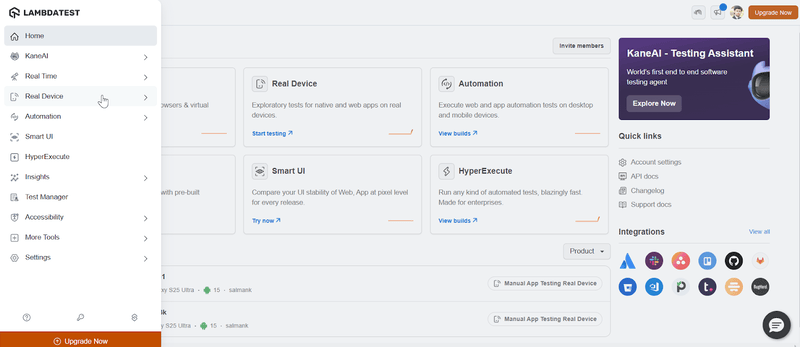
- Sign up on TestMu AI. Visit the TestMu AI dashboard and select Real Device from the left sidebar.
- Select the platform (Android or iOS). Then, upload your mobile game application, and select the device brand and its respective model. After that, click the Start button.
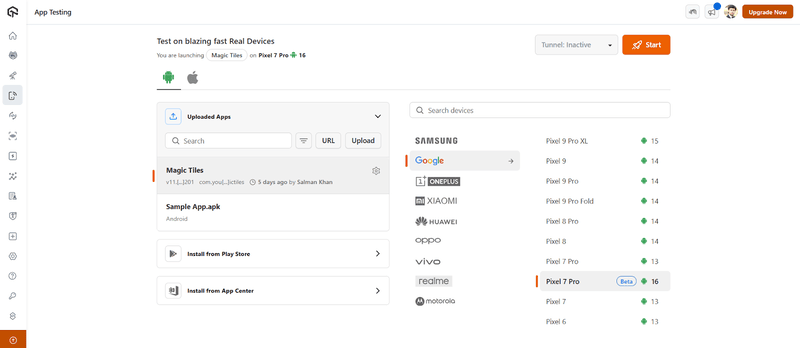
It will launch a real device cloud where you can test your mobile games and catch bugs in real-time, ensuring your game works perfectly.
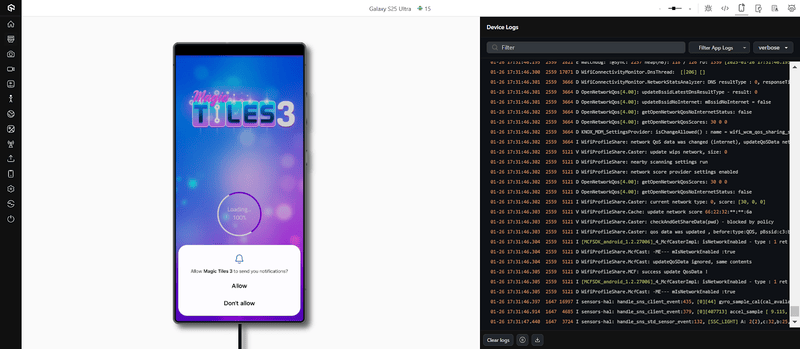
To get started, check out this guide on mobile app testing with TestMu AI.
Challenges of Mobile Game Testing
While mobile game testing is critical to ensuring a seamless player experience, it has some challenges. These often arise from the diversity of devices, dynamic user environments, and other aspects.
Below are some of the challenges associated with mobile game testing:
- Testing is a huge task because of the diversity of mobile devices, operating systems, and screen sizes.
- Varying network conditions impact mobile games. Testing all possible network conditions, such as weak signals or intermittent connectivity, can be very challenging. Tools may simulate some conditions, but the real-world interplay of networks can remain unpredictable.
- Although mobile game testing tools efficiently test various scenarios, they may not fully replicate real-world conditions. Factors like user behavior, geographic variations, and unanticipated player actions are difficult to predict and simulate.
- Many mobile games integrate third-party features such as social media, payment gateways, or analytics tools. Testing these integrations across different devices and environments can be cumbersome. Issues with API calls, SDK versions, or incompatibility with specific devices often go unnoticed during testing.
- Ensuring security while making in-app purchases and player data that can be present in any mobile game is a complex task. It is virtually impossible to test for every kind of vulnerability, considering hacking attempts and data breaches are dynamic.
So, testing on such a constantly expanding list of devices is time-consuming and resource-intensive. For instance, ensuring uniform gameplay on high-end devices versus low-end devices requires extensive testing.
However, constraints such as budget, time, and access to a wide range of devices often result in incomplete testing, leading to potential bugs on specific configurations.
For example, players in remote areas might experience frequent disconnections or slower gameplay, which can go untested. As a result, network-related bugs often surface post-launch, affecting user satisfaction and retention.
This limitation can lead to bugs or usability issues surfacing only after release. For example, testing might miss how different cultural contexts affect gameplay preferences or how long gaming sessions impact device performance and battery life.
For example, a payment gateway might work seamlessly on one device but fail on another due to minor differences in API handling, resulting in a poor user experience for some players.
Hackers continually find new ways to exploit mobile games, and testing tools and frameworks may not always detect advanced security risks. This can result in compromised user data or financial fraud, negatively impacting a game’s reputation.
Best Practices for Mobile Game Testing
While the challenges mentioned above are significant, a strategic approach to testing can mitigate their impact.
The best practices mentioned below help identify bugs, optimize performance, and ensure compatibility across devices.
- Thoroughly understanding the game mechanics, goals, and target audience. Knowing what the game is about helps you test it like a real player.
- Check if the core gameplay feels smooth and fun. Pay attention to controls, responsiveness, in-game physics, and whether the game is challenging yet fair.
- Mobile games need to work on various devices with different screen sizes, operating systems, and hardware capabilities. Always test on a mix of high-end, mid-range, and budget devices.
- Use automation tools to speed up repetitive testing tasks, but combine this with manual testing for a human touch.
- Test for lag, crashes, and battery drain. A game that is too resource-intensive or frequently crashes can lose players.
- Test your game on different network speeds (Wi-Fi, 4G, 5G) and under various conditions, such as low bandwidth or dropped connections.
- Simulate heavy player loads to see how the game handles traffic. This is especially important for multiplayer games.
- For games released in multiple regions, make sure translations are accurate and culturally appropriate. Test right-to-left languages and special characters.
- If the game includes ads, in-app purchases, or reward systems, ensure they work smoothly without affecting gameplay.
- Games with in-app purchases should be tested for vulnerabilities and protected against hacks and threats.
- Every update or patch can introduce new bugs. Perform regression testing to ensure existing features aren’t broken.
- If possible, involve real players or focus groups during beta testing to identify areas for improvement.
Conclusion
Testing a mobile game is a fundamental step in game development. This ensures that the games are of the highest quality and performance and provides an excellent player experience. Focusing on aspects such as functionality, compatibility, security, and user experience can ensure that the game performs well under different conditions and on a wide range of devices.
Furthermore, leveraging mobile game testing tools and real testing environments will help upgrade the game’s usability, performance, and security.
Citations


Summarize with AI


Frequently asked questions
Did you find this page helpful?
More Related Hubs
TestMu AI forEnterprise
Get access to solutions built on Enterprise
grade security, privacy, & compliance
- Advanced access controls
- Advanced data retention rules
- Advanced Local Testing
- Premium Support options
- Early access to beta features
- Private Slack Channel
- Unlimited Manual Accessibility DevTools Tests